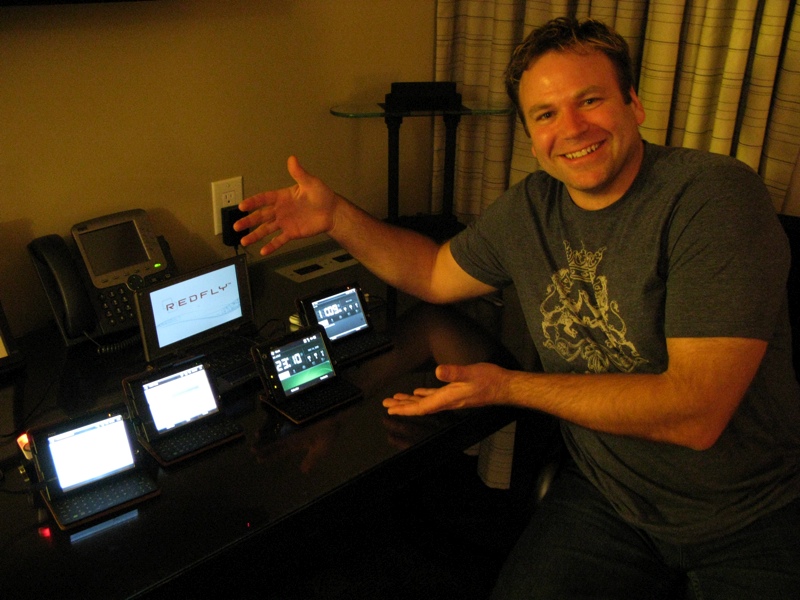
This is going to be a much quicker unboxing than I usually like to do, mainly because it is almost 3am Texas time, and I have to be up in 5 hours to get ready for the next Mobius session. Anyway!

After our dinner tonight, Matt Miller, Ed Hardy, Joel Evans and I met up in Matt’s suite to geek out with our new HTC Advantage 7510s. I managed to capture the unboxing photos, which I wanted to take and post before I really started using the device tomorrow…

Gear Diary Unboxing the HTC Advantage 7510 photo
This picture of Matt is specifically for Mike Cane. Gear Diary Unboxing the HTC Advantage 7510 photo

I promise to post impressions soon, but right now I am just too tired. Gear Diary Unboxing the HTC Advantage 7510 photo


HTC Advantage X7500
HTC Advantage X7501
HTC Advantage X7510
Processor 624 MHz with ATi™ Graphic Chip W2284 624 MHz CPU with ATi™ Graphic Chip W2284 Marvell® PXA270 624 MHz with ATi™ Graphic Chip W2284
Operating System Windows Mobile® 5.0 Pocket PC Phone Edition Windows Mobile® 6 Professional Windows Mobile® 6 Professional
Memory ROM: 256 MB
RAM: 128 MB SDRAM
Microdrive 8GB
ROM: 256 MB
RAM: 128 MB SDRAM
Microdrive 8GB
ROM: 256MB
RAM: 128MB SDRAM
Flash: 16GB
Dimension 133.5 mm (L) x 98 mm (W) x 16 mm (T) Thickness with keyboard: 20 mm 133.5 mm (L) x 98 mm (W) x 16 mm (T)
Thickness with keyboard: 20 mm
133.5 mm (L) X 98 mm (W) X 16 mm (T)
Thickness with keyboard: 20 mm
Weight 359g (with battery) 359g (with battery) 375g (with battery)
Display 5″ transmissive TFT-LCD with backlight LEDs, touch-sensitive screen 5″ transmissive TFT-LCD with backlight LEDs, touch-sensitive screen 5-inch TFT-LCD with backlight LEDs, touch-sensitive screen
Network HSDPA/UMTS (2100 MHz for Europe, 850/1900 MHz for USA)
Quad-band GSM/GPRS/EDGE: 850, 900, 1800, 1900 MHz (The device will operate on frequencies available from the cellular network)
HSDPA/UMTS (2100 MHz for Europe, 850/1900 MHz for USA)
Quad-band GSM/GPRS/EDGE: 850, 900, 1800, 1900 MHz (The device will operate on frequencies available from the cellular network)
HSDPA/WCDMA: 2100 MHz for Europe and 850/1900 MHz for USA, with up to 384 kbps upload and 1.8 Mbps download speeds
GSM/GPRS/EDGE: Quad-band 850, 900, 1800, 1900 MHz (The device will operate on frequencies available from the cellular network.)
Device Control 5-way Navigation Control
HTC VueFLO™ motion sensor assisted browsing experience
5-way Navigation Control
HTC VueFLO™ motion sensor assisted browsing experience
Keyboard Dual usage QWERTY keyboard for text input and display protection Dual usage QWERTY keyboard for text input and display protection Dual usage QWERTY keyboard for text input and display protection
Connectivity Bluetooth® 2.0
Wi-Fi®: IEEE 802.11 b/g
HTC ExtUSB™(11-pin mini-USB and audio jack in one)
HTC proprietary 16-pin combined port (USB 1.1 host/VGA and TV Out)
Bluetooth® 2.0
Wi-Fi®: IEEE 802.11 b/g
HTC ExtUSB™(11-pin mini-USB and audio jack in one)
HTC proprietary 16-pin combined port (USB 1.1 host/VGA and TV Out)
Bluetooth® 2.0
Wi-Fi®: IEEE 802.11 b/g
HTC ExtUSB™ (11-pin mini-USB 2.0 and audio jack in one)
HTC proprietary 16-pin combined port (USB 1.1 host/VGA and TV Out)
3.5mm stereo audio jack with microphone
Camera Main camera: 3 megapixel camera with autofocus and flash light
Second camera: VGA CMOS imaging sensor
3 megapixel camera with autofocus and flash light Main camera: 3.1 megapixel color camera with auto focus and flash light
Second camera: VGA CMOS color camera
Audio Built-in/Dual, Hands-free (microphone and speaker)
Headphone: AMR/AAC/WAV/WMA/MP3 codec
Built-in/Dual, Hands-free (microphone and speaker)
Headphone: AMR/AAC/WAV/WMA/MP3 codec
Built-in microphone and dual speakers
Ring tone supported formats:
- MP3, AAC, AAC+, WMA, WAV, and AMR-NB/WB
- 40 polyphonic and Standard MIDI format 0 and 1 (SMF)/SP MIDI
Battery Rechargeable Lithium-ion battery
Capacity: 2100 mAh
Standby time: Up to 300 hours (for GSM/UMTS)
Talk time (Screen off):
Up to 5.5 hours for GSM
Up to 4.5 hours for UMTS
Rechargeable Lithium-ion battery
Capacity: 2100 mAh
Standby time: Up to 300 hours (for GSM/UMTS)
Talk time (Screen off):
Up to 5.5 hours for GSM
Up to 4.5 hours for UMTS
Rechargeable Lithium-ion polymer battery
Capacity: 2100 mAh
Standby time: Up to 300 hours for GSM/WCDMA
Talk time (Screen off):
 Up to 5 hours for WCDMA
 Up to 6 hours for GSM
Video call: Up to 2 hours
(The above are subject to network and phone usage.)
Expansion Slot miniSD™ (Hot swap and SDHC compatible) miniSD™ (Hot swap and SDHC compatible) miniSD™ (Hot swap and SD 2.0 compatible)
AC Adapter Voltage range/frequency: 100 – 240V AC, 50/60 Hz
DC output: 5V and 1A
Voltage range/frequency: 100 – 240V AC, 50/60 Hz
DC output: 5V and 1A
Voltage range/frequency: 100 ~ 240V AC, 50/60 Hz
DC output: 5V and 1A

Tags: , , , , ,


About Judie Lipsett Stanford

View all posts by Judie Lipsett Stanford
I have had a fascination with all types of gadgets and gizmos since I was a child, beginning with the toy robot that my grandmother gave my brother - which I promptly "relieved him of" in 1973. I have long been captivated by devices that did anything interesting or served a unique purpose - however silly. I can't tell you how everything works – but I am known world-wide for using a product until I have a full understanding of what it does, what its limitations are, and if it excels in any given area...or not.
  • Bjenk Ellefsen

    Matt’s smile says it all!

    I think it is safe to assume Judie will be using that 7510 for awhile!

  • http://www.geardiary.com Judie Lipsett

    Yeah, I think that is safe to say. :mrgreen:

  • Heatwave316

    Did the 7510 mention CDMA, like US CDMA for us lowly Verizon users???

    Any mention of price? $500/$700???

  • http://www.geardiary.com Judie Lipsett

    Well, here’s the problem. I don’t know that these will ever be easily or readily available in the US. They have the Qualcomm chip that held up so many other devices last year; I didn’t even find that out until last week, so I was planning on importing if necessary. These are so new that they say “Test Only, Not for Sale” when they boot. :-/

  • globecode

    Can you actually hold it to type on the keyboard or does it need to be sitting a desk?

  • http://www.geardiary.com Judie Lipsett

    globecode, there is a very strong magnet holding the keyboard to the Advantage, and you can definitely hold it and key. I’ll admit that the first few times you do it you might sweat a little, but it’s quite secure.

  • Pingback: Gear Diary unboxes the HTC 7510

  • Pingback: I Make Judie Lipsett An Offer « Mike Cane 2008

  • Joel McLaughlin

    Just can;t use this devices as a phone. I mean it is a phone and is capable, but it’s not normal to me. You almost HAVE to use this with a BT headset.

    It would be more useful as a data only device. I think that’s what I would do with it.

  • http://www.geardiary.com Judie Lipsett

    That’s exactly how I will use it. But the fact that it could be used as a phone in a pinch is very attractive to me. But there are certainly those who do use it as their main mobile phone – Aura Mae is one of them. :-)

  • globecode

    It’s too bad that the keyboard handle couldn’t be folded down so that the keyboard looks like the slide keyboard of the tilt.

    Can you add a sim card without powering down or restarting and it is recognized?

  • TrvlngDrew

    Wow! A real nice new toy! A little suprised its not WM6.1 and that they are sticking with the mini-SD format. We didn’t get the Advantage 7501 down here in AU so probably won’t see this one either.. :-(

  • http://www.geardiary.com Judie Lipsett

    Drew, it is 6.1! That list isn’t quite correct. ;-)

  • TrvlngDrew

    Glad to hear that, sure wish I had the time to have a look at the differences and see if its really worth waiting for updatess and what not.. I might just update my HTC TyTN II and carry on until 2009. So what are you working at this late hour? :-)

  • http://www.geardiary.com Judie Lipsett

    Oh Drew…I had a hell of a day. After lunch we went downstairs for an indoor golf session, and when we got back to the meeting room, my MBP was frozen. The hard drive was making a racket and I had to leave session early to hit the Apple Store’s Genius Bar. I need to write a post about what ensued…I don’t think anyone will believe it all.

    But needless to say, a less than three month old loaded out MacBook Pro suffering a massive hard drive crash in the middle of a conference sponsored by Microsoft was more than just a little bit ironic. ;-)

  • TrvlngDrew

    WOW!! Can’t wait to hear about that also considering the posts about all the Macs in attendance at Mobius.. Vellly Vellly intelesting.. :-(

  • Heatwave316

    Yikes Judie!!! Sorry to hear about the crash. Maybe the MS gives were giving off to many anti-mac vibes. I’m sure they’ll be more than willing to give you a hard time about the crash….:)

  • Aktopshooter

    Sweet device looking forward to the review I can’t believe this slipped by me I didnt really find out about it until yesterday that you guys received the units. I think I still will just buy the X7501 rather than this device I think I would miss the joystick

  • http://www.geardiary.com Judie Lipsett

    Ha, they were all super supportive. I will try to get the whole story written tonight, right now I am sitting at Seattle’s airport waiting for my flight. :-)

  • http://www.geardiary.com Judie Lipsett

    @AKtopshooter – I do miss the joystick; it makes no sense to me why it is missing. The keyboard is also missing some of the buttons that were on the 7500. I do like the haptic feedback on the 7510′s keyboard, however. I’m sure that there are plusses and minuses I have yet to discover, too.

  • http://geardiary.com Christopher Spera

    Hope everything turned out ok. was curious to know how things went with the MBP…

  • http://www.geardiary.com Judie Lipsett

    The went poorly, to say the least. I’ll write about it tonight after I get home. Getting on plane, soon…

  • TechWizard

    Judie – I know why your new MBP crashed – so did mine!

    WARNING: OWNERS YOU MUST READ THIS Love Hate Relationship! I love this powerful windows mobile device. Using real apps like Slingplayer, Fring, Tom Tom Nav 6 and Core Video player. I hate the fact that it took 2 hardrives in my Macbook Pro before i realize that I was sitting the device too close to the Mac hard drive. Why should this matter? Because of that HUGE keyboard Magnet. It totally ruined the hard drive and I had no clue what was going on until I recently thought thru my exact steps. – I sat the 7510 on the mac during a bluetooth transfer. WATCH OUT- Don’t put your 7510 in your casually in your bag next to your laptop either!!!! – HTC – you need a WARNING Sticker to let everyone know about this big problem.

    David Bankston (TechWizard)
    http://web.mac.com/bankman2/Site/Podcast/Podcast.html

  • Pingback: HTC Advantage 7510 Gets Reviewed By Matt Miller and Others | Gear Diary


Sony NEX-6 Smart Remote Control in 90 Seconds

I upgraded my camera to the Sony NEX-6 today, and I am already loving it. At $899 for the body [...]

Budd Coates Teaches ‘Running On Air’ – The Monday Mile

Running on Air

I remember being about 20 miles into my first marathon, and the pacer making a very big deal about breathing [...]

Kinivo BTX350 Digital Wireless Speaker Review

I’m a big fan of Bluetooth enabled, wireless speakers in this age of cell phones, tablets, and computers.  We’re always [...]

Madden NFL 25 Anniversary Edition Amazon Exclusive Deals

EA Sports, Amazon, and DirecTV have released details on great deals included in the upcoming limited-edition version of the Madden [...]

team & marke Launches Fläzbag Tablet Pillow Stand

I don’t know about you, but when I think of “products from Germany”, I think of severe stuff, by and [...]

Toddy Screensters Clean Your Screen with Character

Toddy Screensters

If you own any device with a touchscreen, then you know all too well how quickly and easily they get [...]