

Gear Diary Mac Utility Jumpcut Remembers All Your Clipboard Items photo

I rely on my iMac’s “clipboard” a ton.  Between Twitter, the Internet, e-mail etc. it seems I’m constantly copying and pasting links and other information between one client to another.  Often times I copy more than one item too and that means I have to go back and forth between the applications to retrieve and re-copy each time.  An even larger problem occurs when I want to paste something I copied earlier in the day but have already copied something else thus over-writing the item I want.

A nice little free utility I stumbled across the other day called Jumpcut solves these problems.

Jumpcut is an application that provides “clipboard buffering” — that is, access to text that you’ve cut or copied, even if you’ve subsequently cut or copied something else. The goal of Jumpcut’s interface is to provide quick, natural, intuitive access to your clipboard’s history.

Once installed Jumpcut lives on your Mac’s menu bar.  A quick click of it reveals a drop down list of everything you’ve copied to the clipboard.  When you want to insert an item simply scroll to it and click.
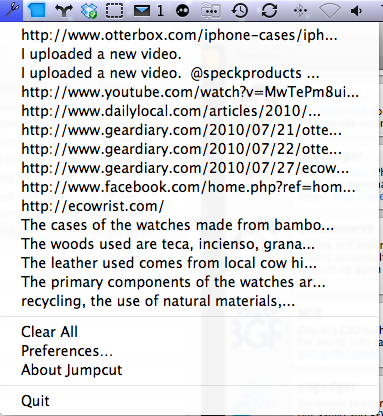
Gear Diary Mac Utility Jumpcut Remembers All Your Clipboard Items photo

In Jumpcut’s preferences you can configure how many items you’d like it to remember and whether or not it saves them all when you exit or not.
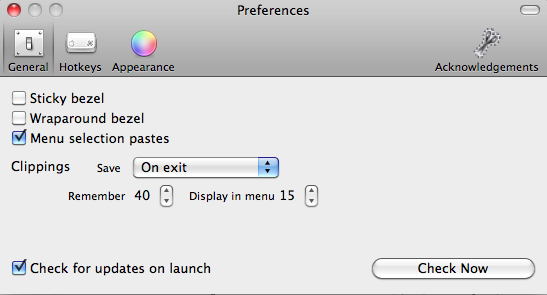
Gear Diary Mac Utility Jumpcut Remembers All Your Clipboard Items photo

If you don’t prefer to envoke Jumpcut via the menu icon there are a few other options for doing so.  You can set up a hot key combination to start it.  Pressing your predetermined key stroke combination will then bring up the clipboard list.
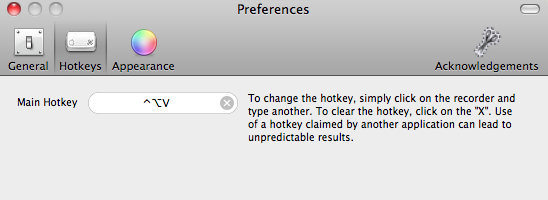
Gear Diary Mac Utility Jumpcut Remembers All Your Clipboard Items photo

You can also choose to hav Jumpcut display itself as a bezel.  The bezel shows one clipboard item at a time and you use the arrow keys to scroll through other recent ones until you’ve found the item you’d like to insert.  I personally find the menu bar method to be the easiest to use.

Gear Diary Mac Utility Jumpcut Remembers All Your Clipboard Items photo

MacMost has a video demonstration of Jumpcut in action, see it below.

Jumpcut is available as a open source free download here.

Tags:


I have always had a passion for gear and gadgets. It all started for me with the release of the very first Palm Pilot. I've always had an interest in handheld electronics. From handheld PDAs, to cell phones, Mp3 players, watches and other products, I'm the first person my friends, family and colleagues call when they need advice on tech. I have roots in the online tech. forum community. I served as the Administrator to Howard Forums.com and as a Moderator at both Treo Central.com and Blackberry Forums.net. Under the screen name “lgreenberg” I've amassed 50,000+ postings. I also manage my own YouTube channel under the user name larrygreenberg. I'm always eager to help.
  • http://twitter.com/blogsoftheworld/status/19888246885 blogs of the world

    Often times I copy more than one item too and that means I have to go back and forth betwe… http://reduce.li/izsds9 #item


For Memorial Day, EA Holding Massive iOS Sale and G5 Having Huge Kindle Fire Sale!

Never a bad time for a great sale! Just in time for that classic gaming holiday – Memorial Day – [...]

Buy GRID 2: Mono Edition – The Most Expensive Video Game Ever

Got $190,000 laying around? Then you can make history and purchase GRID 2: Mono Edition, which includes an actual 170mph [...]

Switching Smartphones and Carriers Is Getting Harder Than Ever

Reading over Carly’s post and the comments made something clear to me – plenty of people have at least a [...]

Fast & Furious 6 Film Review

The ‘bigger is better’ filmmaking mantra works as this monstrous action-racing film series keeps upgrading with Fast & Furious 6 [...]

Heavy Gear Assault Multiplayer Game Launches Kickstarter Campaign

Heavy Gear Assault

The Heavy Gear world dates back to the 90s as a tabletop boardgame and card combat game, and came to [...]

Combo Crew for iOS and Android Pulls No Punches!

Type of app: Action-Fighting Platform/where to buy: iOS or Android; available in the iTunes App Store or available in the [...]