

The Hype
The uDraw GameTablet™ is a first-of-its-kind, revolutionary game system that provides a unique and fun way for kids and families to play with Wii™. With innovative features that allow kids to express themselves and bring their imaginations to life, the uDraw GameTablet™ creates an all-new category of play through an easy-to-use system. The uDraw GameTablet™ will come bundled with the uDraw Studio™ game software.
Key Features:
- Connectivity – Wii Remote™ docks with the uDraw GameTablet and draws battery power directly from Wii Remote.
- Exceptional Movement – Offers players unique tilt movement options by capitalizing on the Wii Remote’s motion sensors. Players can control their characters, moving and directing them throughout levels of the game.
- Simple Design – Pressure sensitive stylus features two buttons that mimic the C and Z buttons of the Wii Nunchuk allowing players easy operation with intricate movement capabilities.
- Accessory Integration – Features convenient storage area for wrist strap and stylus, as well as ink well for quick storage.
- Generous Surface Area – A 4×6 drawing space provides users with plenty of creative room yet remains small enough for easy maneuvering.
The Reality
This pick-up and play peripheral has no electronic tutorial so users have to go with what they know at the beginning. The manual provides a lot of guidance in the artistic actions for the include uDraw Studio game. Players can use the Wii remote, placed in a special bay on the left of the tablet to paint, airbrush, change colors, draw, customize canvas types, replay art creations plus archive and share creations. Finished works can be saved on the SD card in the Wii as JPEG or PNG graphic files.
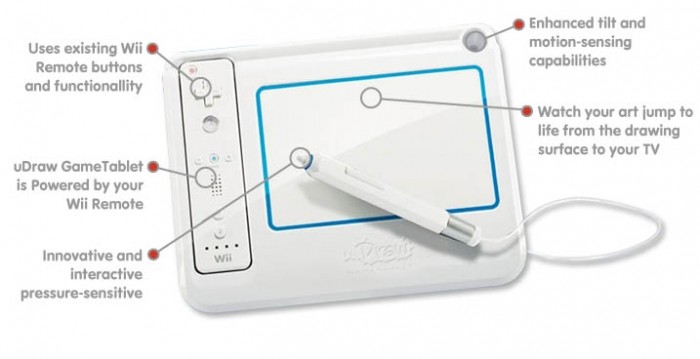
Game developers take great consideration in the placement and use of the Wii Remote and pen, though left handed players again have a slight disadvantage. Other design elements include an indentation on top and around the 4 x 6 inch pad area to keep the pen from running off under normal usage. Like many Wii music game instrument controllers, the remote (without MotionPlus) pops into its own bay. The panel door underneath provides additional room to connect the remote to the tablet.
The Wii remote is famous for its amazingly long range. Developers use this strength to their advantage. The tablet has less material near the top and does not block button signals from the remote top (IR sensor) to the Wii when playing uDraw Studio. Using the remote outside the uDraw Studio game (e.g. navigating the Wii main menu) prompts removal from the bay, so get in the game before getting cozy with the tablet. Players use remote buttons on top (A, plus and minus buttons, etc.) and below (B/trigger button). Players can change color and utilize other options with the B button underneath. Press the minus-button to undo a brush-stroke The 1 button loads the eraser while the 2 button addresses the art tools in the “bucket”.
The pen has a pressure sensitive tip and a long button along the side. The pen cord is attached from the middle and can rest in the circular inkwell holder on the top right. This setup can be a disadvantage for left-handed artists, but the pen can rest anywhere loosely or in the special open notch underneath. It can be hard for younger kids to push down on the controller pen. Optional use of the Nunchuk would have been a great option, but this design makes it impossible. Experimental attempts to play Epic Mickey and other related Wii games using the uDraw tablet failed because they only allowed nunchuk use. The pen control style should seem very familiar and comfortable for gamers, especially Nintendo DS players who use the stylus. Youngsters can still draw with some adjustment and tablet placement on a hard floor. Stamps are one of the easiest activities because players can use the weight of the pen to do the work.
The chalk, pencil, pen, and charcoal options provide great contrasts and textures. Sizing options are great while players can customize or create their own color palettes. Various environments like the beach enhance the game while the canvas options also add some appeal.
The music is nice, but not particularly inspiring or memorable, so playing regular music enhances the experience more. The sound effects can be helpful, but simple menu design easily distinguishes the selection windows to show current used items and options.
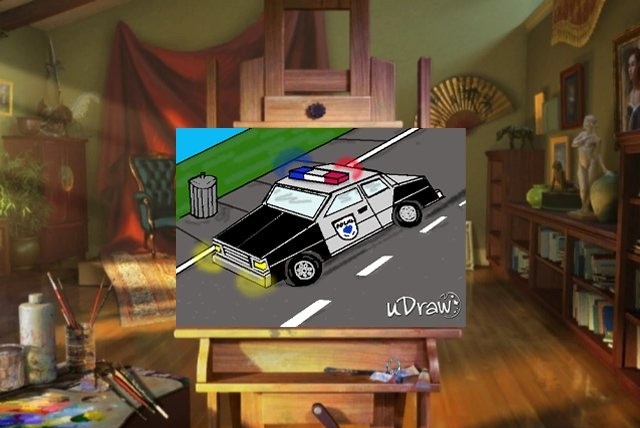
Players can get really creative with overlays and even see through templates carefully draped over the television screen. The gallery store player art works where they can be modified or replayed. Yes, the outstanding replay options lets players watch each hard earned movement eventually form their finished product. Speeds include normal plus eight or nine times the normal speed. Puzzle making activities like mazes and other recreated works are just some possibilities.

Check out the game’s World of uDraw website, which includes an amazing user gallery. Other uDraw games available are Pictionary and Dood’s Big Adventure with many more on the way. Interactive crosswords, a 3D game, or a unique platformer would be great.
Review: uDraw Tablet
Where to Buy: Amazon and stores everywhere
Price: $69.99 (currently selling for $61.99)
What I Like: one-of-a-kind artistic peripheral, great peripheral alternative for Wii owners, saves to SD card in the Nintendo Wii, immense options, replay option, promising uDraw tablet game library coming soon
What Needs Improvement: more sensitive pen controls, better button placement, lower price, improved left handed capability
Source: Reviewer copy provided by publisher

#wii Wii Game Review: uDraw Studio – Game and Tablet | Gear Diary http://bit.ly/f3BUe0
Wii Game Review: uDraw Studio ? Game and Tablet #gadgets http://bit.ly/eaMYPT
Wii Game Review: uDraw Studio – Game and Tablet | Gear Diary: Experimental attempts to play Epic Mickey and othe… http://bit.ly/gppUaH
Wii Game Review: uDraw Studio – Game and Tablet | Gear Diary http://bit.ly/g0ZM4U
Wii Game Review: uDraw Studio – Game and Tablet | Gear Diary: Experimental attempts to play Epic Mickey and othe… http://bit.ly/fcLHFS
Wii Game Review: uDraw Studio – Game and Tablet | Gear Diary: The Hype. The uDraw GameTablet™ is a first-of-its-… http://bit.ly/i6HSSs
http://bit.ly/17Kg8e Wii Game Review: uDraw Studio – Game and Tablet | Gear Diary http://bit.ly/dJHpqf
Wii Game Review: uDraw Studio – Game and Tablet | Gear Diary: Experimental attempts to play Epic Mickey and othe… http://bit.ly/gvJ1dR
Wii Game Review: uDraw Studio – Game and Tablet | Gear Diary: Experimental attempts to play Epic Mickey and othe… http://bit.ly/eUUrvA
Wii Game Review: uDraw Studio – Game and Tablet | Gear Diary: The uDraw GameTablet™ is a first-of-its-kind, revo… http://bit.ly/hLj6fv