
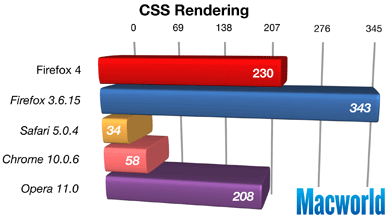
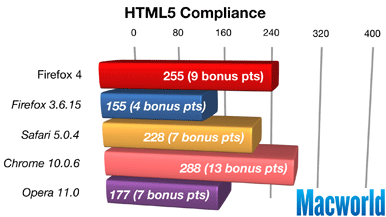
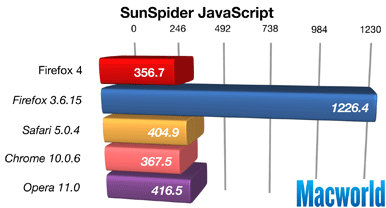
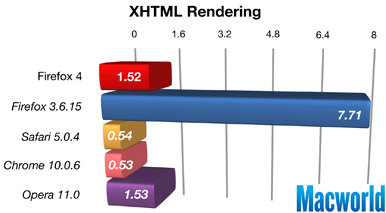
I have been playing around with FireFox 4 for the Mac, since I absolutely adore the Windows version and it has replaced Chrome on my main PCs. My experience hasn’t been all that great – I tend to run loads of things all at once on my Mac and have found the performance … lacking. Turns out I am not alone, as a new review from Macworld shows that while FireFox 4 is much better than the last version, it still lags Safari and Chrome in terms of key performance.
Here are a few graphs they shared:
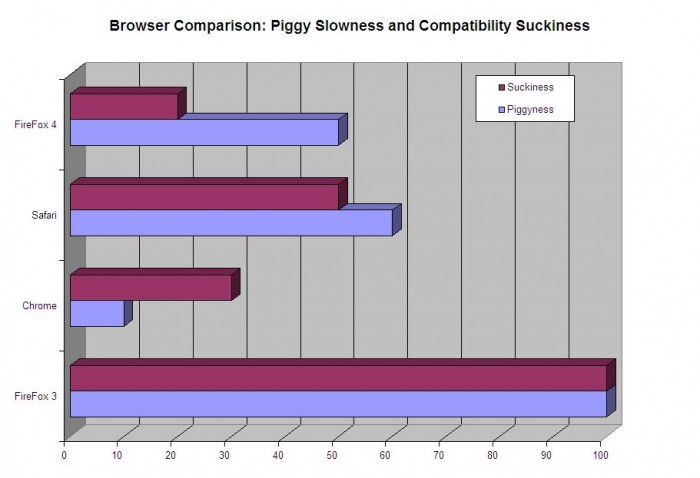
I highlighted my experience in two purely subjective areas: ‘piggyness’ and ‘suckiness’. My graph at the top shows my feelings on the various browsers, with FireFox 3 as the gold standard of a completely crappy Mac browsing experience (since IE is gone, anyway).
Piggyness I define as the extent to which a browser sends my hard disk thrashing if I try to open up even my five tab ‘Minimal’ set. Firefox 3 was brutal, and nothing else can compare to that. However, in recent releases it feels like Safari is racing to become the worst performing browser on the Mac! I have found it starts slow, loads slow, and is generally a pain to deal with. Chrome is super-fast, though with enough tabs it will start the hard disk chugging! FireFox 4 is SO much better than version 3 it is hard to compare them – it is even quicker than Safari. But it is nowhere near as responsive as Chrome … sorry FireFox!
Suckiness is if a browser forces me to put another browser on my dock in order to handle certain tasks. FireFox 3 was compatible on paper, but again was so wonky and ill behaved on the Mac that it was just a totally sucky experience. For a more specific example, if I don’t have my work PC and need to use corporate webmail, Chrome is a pain with annoying login popups that make no sense, so I will have Safari open with a single tab running webmail. Safari has text box issues with some sites, layout issues with others, and general strangeness way too often to consider it a potential full-time browser. Chrome is one that will either work or not – and generally it works well. There are some compatibility issues, but in general it is a solid experience. FireFox 4 works for every web site I tried, and did a good job …but too many add-ons were not compatible.
So in the end, I am sticking with Chrome. It has a solid balance of excellent performance and compatibility, and is light enough that if I need to run another browser for a single page I won’t bring my system to its knees (unlike with combining Safari and FireFox!).
Review: FireFox 4 for Mac
Where to Buy: FireFox Home Page
Price: Free download
What I Like: Solid compatibility; much improved performance
What Needs Improvement: Still somewhat of a performance/resource pig; update broke too many add-ons
