
The other day I e-mailed Judie and asked, “How do you keep all your various charging and syncing cables organized?”
Her answer was short, to the point, and said everything that needed to be said. “What makes you think that my cords and cables are organized in any way shape or form?”
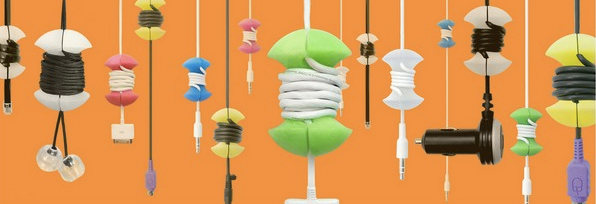
Yes, if you have multiple devices, cable overwhelm can be a bit of an issue. So how does one deal with it? I have tried a host of different solutions which include everything from having specific cables taped underneath my desk and available if I simply reach for them, to a variety of specific cable management devices that sit on the desk. The other day we brought word of a new approach — the Applecore cable management system. I ordered a bunch and they came the other day.
In a few short steps things became a bit more tidy.
Step 1: I packed away most of the cables leaving out just I 1 mini-USB, 1 micro-USB and 2 Apple sync cables (since I have so many IOS devices).
Step 2: I wrapped each cable around an Applecore.
To refresh your memory, Applecores come in three different sizes: small, medium large, and a number of colors. I went for boring and got all of them in either black or white. In keeping with their name cable management systems look just like perfectly eaten apple cores . Using them is quite simple.
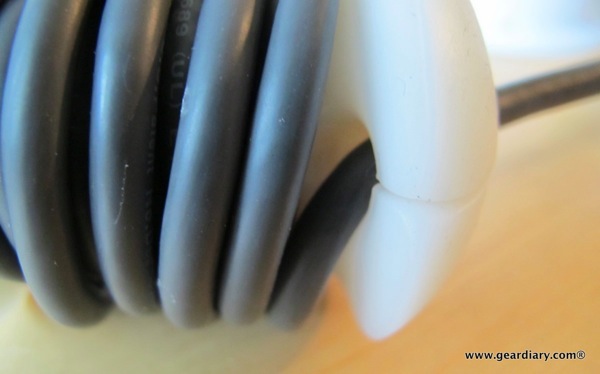
You determine how much of the cord you want to leave available on one side of the cable, pushed it through the opening at the top of the Applecore and then wrap the remaining cable around the middle section. You then push the other end of the cable through the top opening and then BAM … You are good to go.
The result is a much shorter cable that gives you the ability to quickly and easily add length when needed.

The result was a number of distinct, and untangled cables.
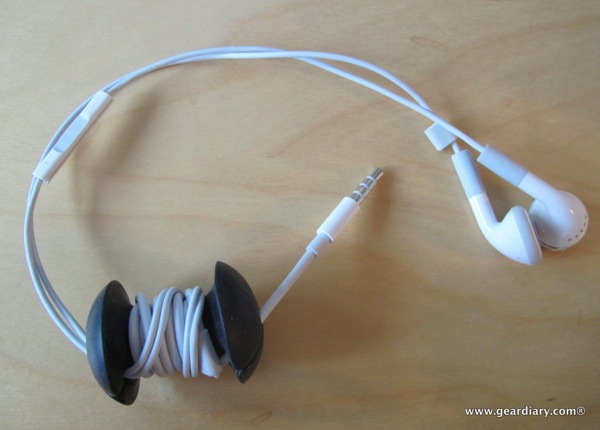
It also worked great for a pair of basic Apple headphones.
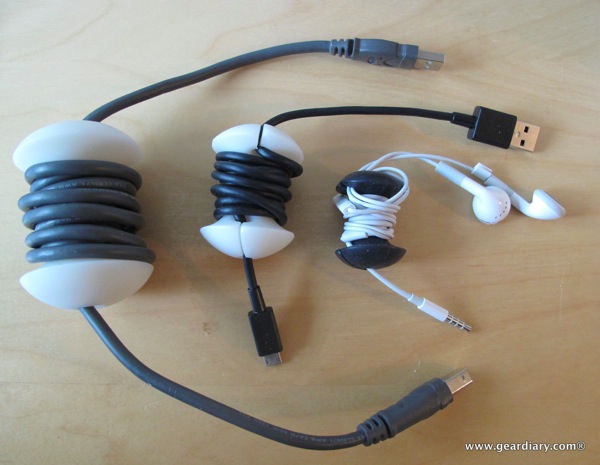
And because the Applecores come in three sizes, I was able to organize a number of cables of various sizes.
You can grab your own from the company Website.
MSRP: Small: $1.99, Medium: $2.99, Large: $4.99
What i Like: Cute name; functional design; inexpensive way to get more organized.
What Needs Improvement: A bit bulky… But effective

Applecores are awesome. I have about 25 of them and I’m always getting asked where to buy them. A simple, elegant solution.