
Gear Diary Mac Quick Tip: Use Faces to Find People and Organize Out of Control iPhoto Libraries photo

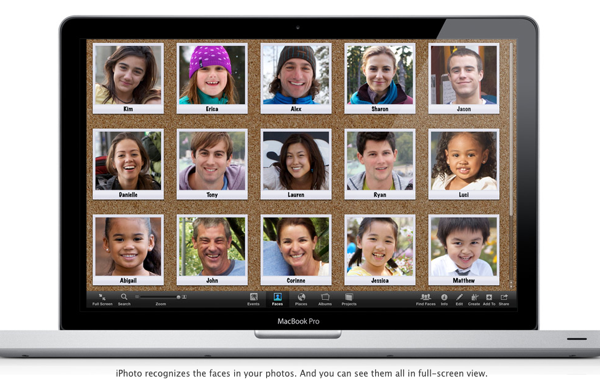
Sometimes it is the little features in a program that can make the biggest differences. iPhoto’s facial recognition is one example of this. I knew the feature was there in the ’11 version of the software but never used it.

Last week Elana’s grandma Pearl died. It was and is sad, but at 87 she had led a long, good life and is remembered fondly by many. We should all be lucky enough to have the same said about us when we are gone. I wanted to put together a montage of pictures to share with Elana and her family, but my iPhoto library was an absolute chaotic mess. That’s when iPhoto Faces came to the rescue.
Gear Diary Mac Quick Tip: Use Faces to Find People and Organize Out of Control iPhoto Libraries photo

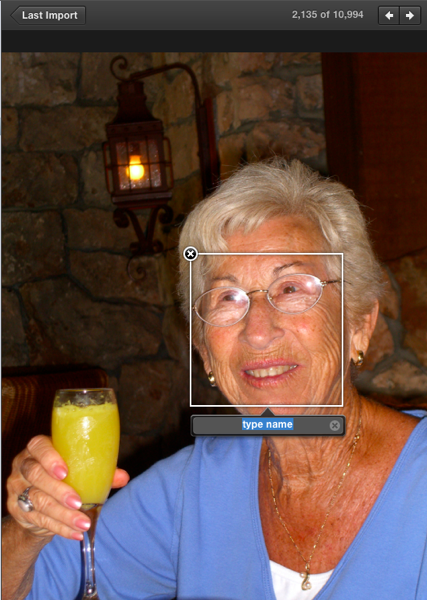
I grabbed one picture of Gram and put my cursor over her face. This dialogue box popped up.
Gear Diary Mac Quick Tip: Use Faces to Find People and Organize Out of Control iPhoto Libraries photo

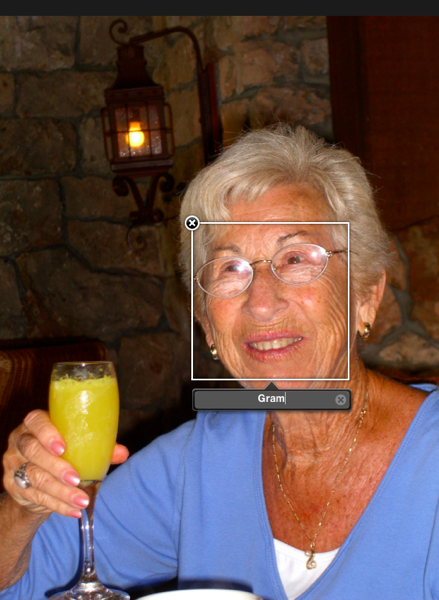
I added her name to it and then went back to the complete library.

Gear Diary Mac Quick Tip: Use Faces to Find People and Organize Out of Control iPhoto Libraries photo

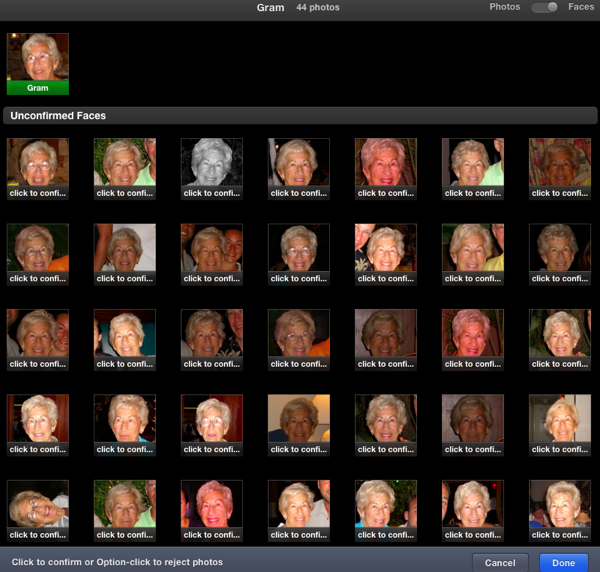
Now her face was identified. The software wants through the entire library and pulled out images that might be Grandma Pearl. On the first pass it pulled up 43 of them.
Gear Diary Mac Quick Tip: Use Faces to Find People and Organize Out of Control iPhoto Libraries photo

I then manually went through each one, telling the software if the image was actually Gram or not; amazingly, it had perfect accuracy.

That done, I was able to put together a slide show. I even included one of my greatest “victories” with her — this past spring I got her to tell an off-color joke on camera!

If you have a Mac and aren’t using iPhoto ’11 and its facial recognition, then you should. It is a great way to find all those random pictures of the people you photograph most.

Tags: , ,


Having a father who was heavily involved in early laser and fiber-optical research, Dan grew up surrounded by technology and gadgets. Dan’s father brought home one of the very first video games when he was young and Dan remembers seeing a “pre-release” touchtone phone. (When he asked his father what the “#” and “*” buttons were his dad said, “Some day, far in the future, we’ll have some use for them.”) Technology seemed to be in Dan’s blood but at some point he took a different path and ended up in the clergy. His passion for technology and gadgets never left him.


Sony NEX-6 Smart Remote Control in 90 Seconds

I upgraded my camera to the Sony NEX-6 today, and I am already loving it. At $899 for the body [...]

Budd Coates Teaches ‘Running On Air’ – The Monday Mile

Running on Air

I remember being about 20 miles into my first marathon, and the pacer making a very big deal about breathing [...]

Kinivo BTX350 Digital Wireless Speaker Review

I’m a big fan of Bluetooth enabled, wireless speakers in this age of cell phones, tablets, and computers.  We’re always [...]

Madden NFL 25 Anniversary Edition Amazon Exclusive Deals

EA Sports, Amazon, and DirecTV have released details on great deals included in the upcoming limited-edition version of the Madden [...]

team & marke Launches Fläzbag Tablet Pillow Stand

I don’t know about you, but when I think of “products from Germany”, I think of severe stuff, by and [...]

Toddy Screensters Clean Your Screen with Character

Toddy Screensters

If you own any device with a touchscreen, then you know all too well how quickly and easily they get [...]