


The Lowdown
The OWC Thunderbolt 5 Dock is the kind of product that’s hard to write drama about, which is exactly the compliment it deserves. It has the ports, the bandwidth, both card slots, looks good, runs silent and cool, and in weeks of use it never once did anything I had to think about. It loses half a point against the V-Core I recently reviewed, only because it has no M.2 slot inside. Everything else about it is right.
Overall
Pros
- Completely fanless, silent, and cool after weeks of daily use
- Precision aluminum enclosure looks and feels like professional equipment
- Both SD 4.0 UHS-II and microSD card readers built in, up to 312 MB/s
- Thunderbolt 5 bandwidth up to 80Gb/s bidirectional and 120Gb/s for video
- Supports up to three 8K displays at 60Hz, two 8K at 120Hz, or three 4K at 144Hz on Windows
- 140W power delivery to the host laptop
- Eleven ports including three downstream Thunderbolt 5, three USB-A, and 2.5Gb Ethernet
- Broad compatibility with Thunderbolt 5/4, USB4, and USB-C hosts
- 1m Thunderbolt 5 cable included
- OWC has been a dependable name in this category for decades
- 2-year warranty
Cons
- No built-in M.2 NVMe slot, which is the one thing a competing dock at this price does offer
- No HDMI or DisplayPort outputs, so older monitors need adapters
- Downstream USB ports max out at 15W on Thunderbolt and 7.5W on USB-A, so no fast charging for phones or tablets
- The glossy top panel shows dust and fingerprints
- Thunderbolt 3 support is Mac-only
OWC has been building Mac and PC storage and connectivity gear since well before most of the companies currently shipping Thunderbolt docks existed, and that history is worth something when you’re about to hang your entire desk off a single cable. The OWC Thunderbolt 5 Dock has been on my desk for the last several weeks, connected to a Thunderbolt 5 Windows laptop. I also have the VectoTech V-Core Thunderbolt 5 Dock here, so there’s a direct comparison worth making at the end.
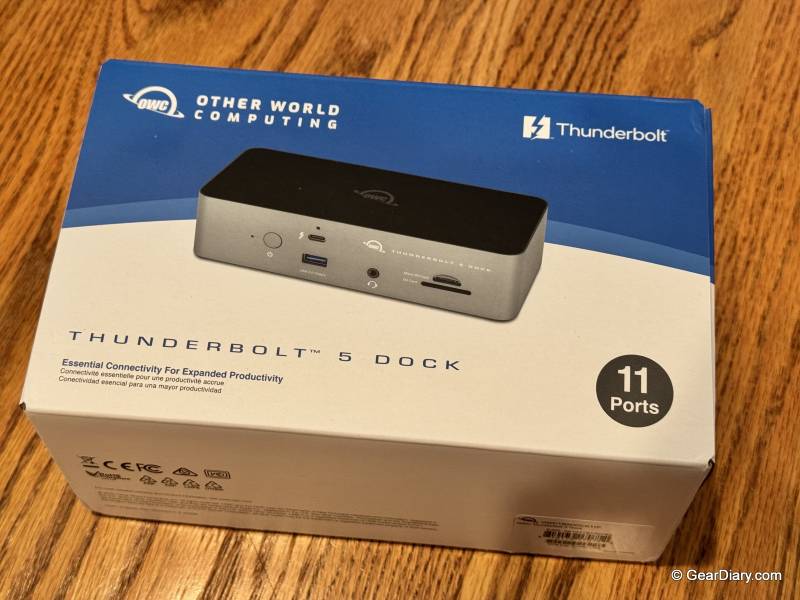
The thing I noticed first, and kept noticing, is that the OWC Thunderbolt 5 Dock doesn’t make any noise. It’s fanless. The whole enclosure is machined aluminum, and the aluminum is the cooling system, which means nothing inside has to spin up, whine, or collect dust over the next three years.
After weeks of daily use, including long sessions with displays running and data moving, I never heard it, and I never felt meaningful heat off the case. Warm, occasionally. Hot, never. That sounds small until you’ve lived with a dock that clicks its fan on every time you copy a folder.
Quick Specs:
- Model: OWC Thunderbolt 5 Dock, 11-port (OWCTB5DOCK11P)
- Host interface: Thunderbolt 5
- Bandwidth: up to 80Gb/s bidirectional, up to 120Gb/s video stream performance
- Upstream: 1x Thunderbolt 5 host port with 140W power delivery
- Downstream: 3x Thunderbolt 5 / USB-C, 15W each
- USB-A: 2x 10Gb/s, 1x 5Gb/s
- Card readers: SD 4.0 UHS-II and microSD UHS-II, up to 312 MB/s
- Networking: 2.5Gb Ethernet
- Audio: 3.5mm combo in/out
- Display support: up to three 8K displays at 60Hz, two 8K at 120Hz, or three 4K at 144Hz on a Thunderbolt 5 Windows host; dual 6K on Mac
- Power delivery: up to 140W to the host laptop
- Cooling: fanless, precision aluminum enclosure
- Compatibility: Thunderbolt 5, Thunderbolt 4, Thunderbolt 3 (Mac only), USB4 and USB4 v2, and USB-C hosts; macOS, Windows 10 and 11, ChromeOS, Linux, iPadOS and Android
- Dimensions: 7 x 3.1 x 1.7 inches
- Weight: 18.7 oz
- In the box: dock, 1m OWC Thunderbolt 5 cable, external power supply and AC cable, OWC Dock Ejector software
- Warranty: 2-year OWC limited
- Price: $329.99 list, $319.99 at most retailers
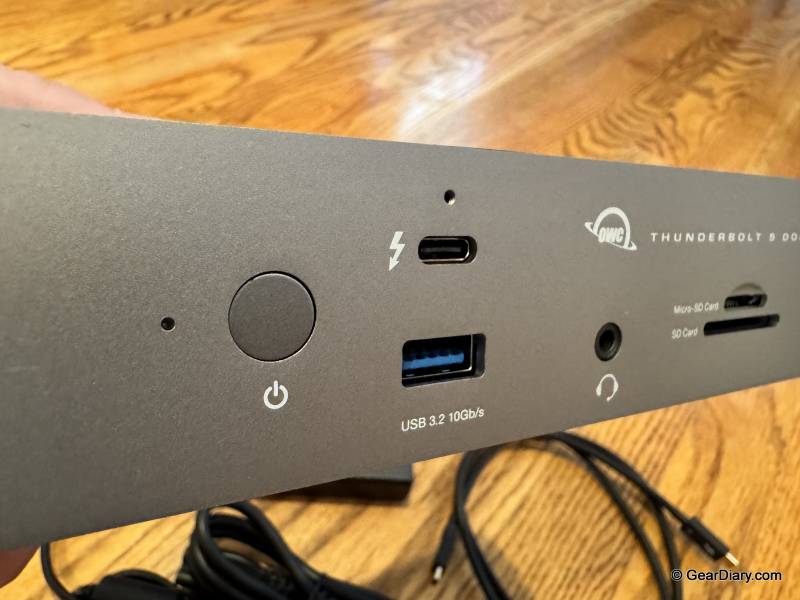
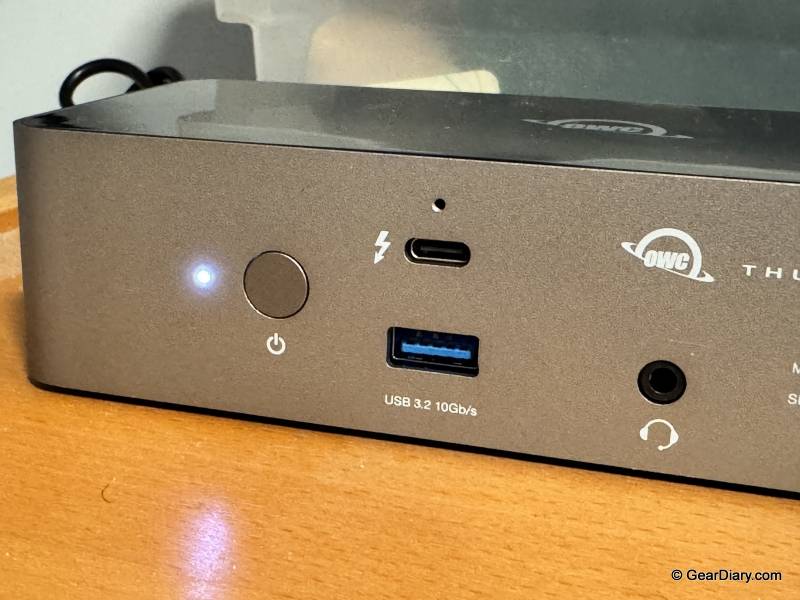
The OWC Thunderbolt 5 Dock’s port layout is sensible and, more importantly, complete. Three downstream Thunderbolt 5 ports handle displays and high-speed peripherals, and there are three USB-A ports, two at 10Gb/s and one at 5Gb/s, for the accumulated pile of keyboards, hubs, and drives that still use the old connector. There’s 2.5Gb Ethernet, which is the correct amount of Ethernet for a dock in 2026, and a 3.5mm combo jack for headsets.
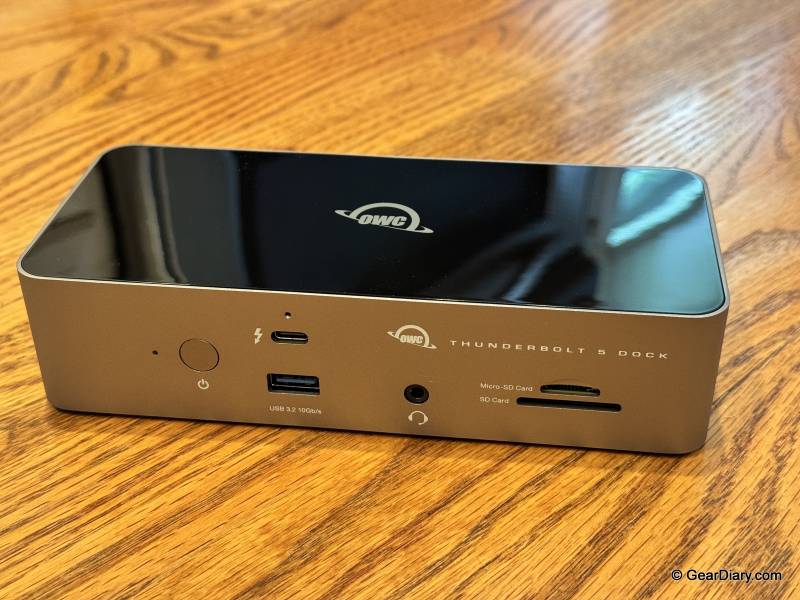
Then there are the card slots, and this is the part I’d underline for anyone who shoots photos or video. Full-size SD 4.0 UHS-II and microSD, both rated up to 312 MB/s, both on the front where you can actually reach them. A lot of docks give you one SD slot and call it done, which is fine right up until the card you need to offload came out of a drone, an action camera, or a Nintendo Switch. Having both means the card reader that lived in a drawer or dangled off a USB port can go away entirely.
Bandwidth is standard Thunderbolt 5 fare, which is enormous: up to 80Gb/s bidirectional, with up to 120Gb/s available for video-heavy work. On my Thunderbolt 5 Windows machine, that translates to up to three 8K displays at 60Hz, two 8K at 120Hz, or three 4K at 144Hz. Mac users get dual 6K, which is Apple’s limitation rather than OWC’s, and worth confirming against your specific machine before you buy monitors.
Power delivery is 140W over the host cable, enough to charge a large Windows workstation laptop or a 16-inch MacBook Pro at full speed while everything else is running.
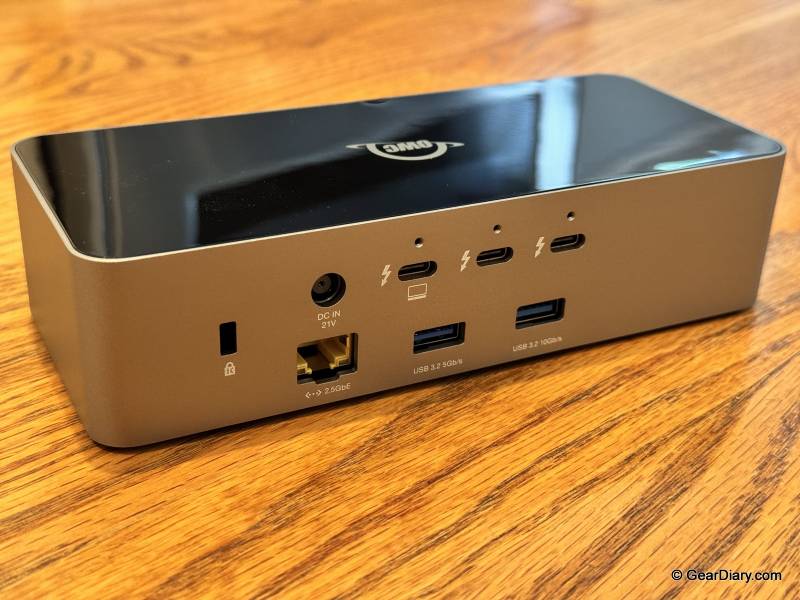
The OWC Thunderbolt 5 Dock’s backward compatibility is broad. Thunderbolt 4, USB4 and USB4 v2, and plain USB-C hosts all work, with the usual caveat that an older host caps what you get. Thunderbolt 3 works on Macs but not on PCs, which is an odd asterisk but an honest one.
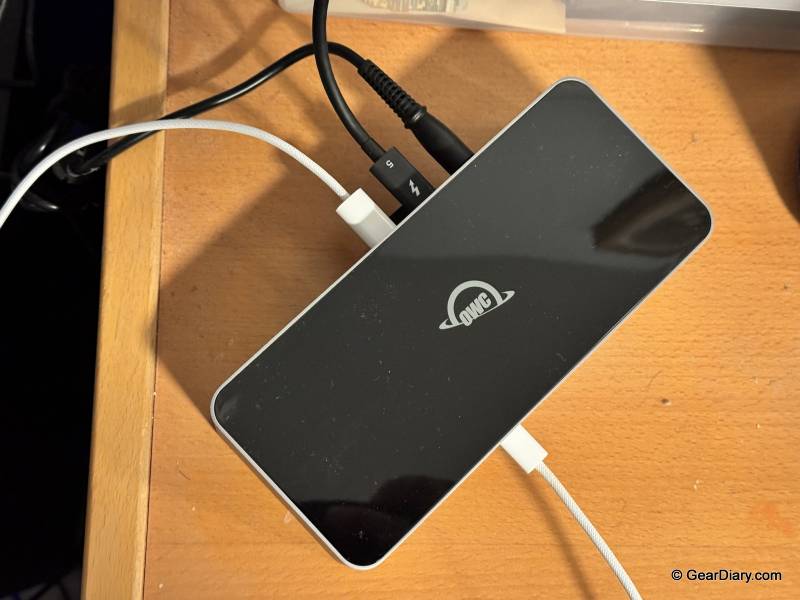
It also looks good, which I don’t usually spend sentences on but will here. It’s a low, clean aluminum slab in space gray with a glossy black top, and it reads more like equipment than a plastic accessory. It sits horizontally, doesn’t take up much desk space, and doesn’t clash with anything. The glossy top does show dust and fingerprints, so if your desk is near a window, you’ll be wiping it occasionally.
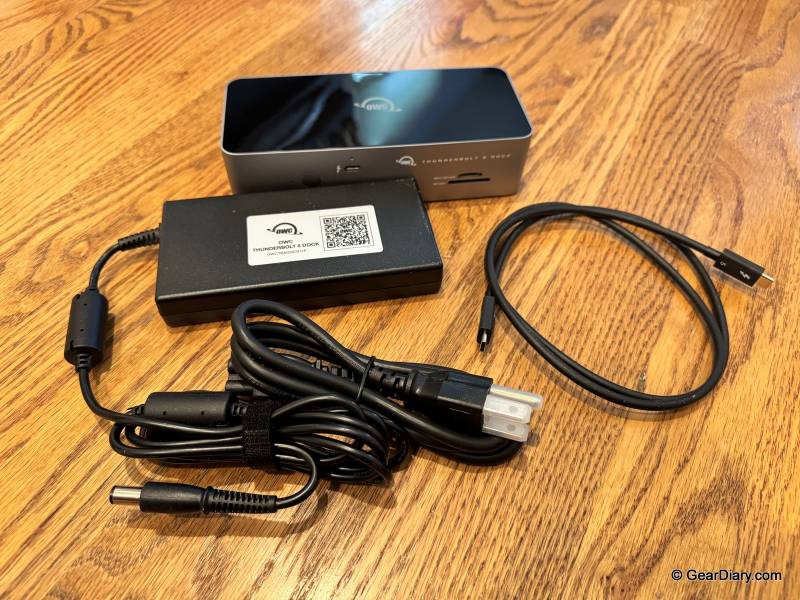
A few limitations are worth naming. The OWC Thunderbolt 5 Dock has no HDMI or DisplayPort output, so every monitor connects over USB-C or through an adapter, which is a reasonable design choice for a Thunderbolt 5 dock but will annoy anyone with older displays. The downstream USB ports deliver 15W on Thunderbolt and 7.5W on USB-A, so this isn’t the dock that fast-charges your phone or iPad while you work. And the power brick is a large external unit, as it has to be to supply 140W, so budget space for it under the desk.
So how does it stack up against the VectoTech V-Core Thunderbolt 5 dock, which I reviewed recently and which sits in the same price neighborhood? The two are close on the fundamentals and genuinely different in the places that matter.
On ports, the V-Core has more USB-A, four at 10Gb/s against OWC’s two at 10Gb/s plus one at 5Gb/s, and one more downstream Thunderbolt port. OWC answers with the card readers: the V-Core has a single SD slot, while OWC gives you SD 4.0 UHS-II and microSD. Both do 2.5Gb Ethernet, 3.5mm audio, and 140W of power delivery from a 180W brick, and both include a 1-meter Thunderbolt 5 cable, which matters more than people expect since the wrong cable is the most common reason a dock underperforms.
The two real differences are storage and noise. The V-Core has an M.2 2280 PCIe Gen 4 x4 NVMe slot inside it, so up to 8TB of fast storage lives in the dock instead of hanging off a port, and that’s a legitimately excellent feature. But it requires active cooling to pull off, and the V-Core’s fan is audible when it spins up under load. The OWC has no internal storage at all, and no fan either, and stays silent and cool because there’s less heat to move.
In a fairly direct way, you’re choosing between built-in storage and silence.
Display ceilings differ slightly too. The V-Core tops out at three 4K displays at 144Hz or two 8K at 60Hz on a Windows Thunderbolt 5 host; OWC matches the 4K 144Hz figure and goes further at the top end with three 8K at 60Hz or two 8K at 120Hz. Practically speaking, almost nobody will hit either ceiling, but the headroom is there.
Price lands close. The V-Core lists at $379 and has been running $299 at Amazon, while the OWC Thunderbolt 5 Dock lists at $329.99 and sells for $319.99 at most retailers. Street prices move, so check both.
There’s no universal winner here, and I’d be suspicious of a review that declared one. If you were going to buy a dock and an external SSD anyway, the V-Core collapses those into one box and saves you a cable, a port, and some money on the drive. If you already have storage sorted, offload camera cards regularly, work in a quiet room, or simply want a dock from a company that’s been supporting this category for decades and will still be answering the phone in five years, the OWC is the one I’d put on the desk.
You’ll probably be happy with the OWC Thunderbolt 5 Dock if you want a single-cable desk with no fan noise, if you shoot on SD or microSD and want both readers built in, if you’re running a serious multi-monitor setup off a Thunderbolt 5 machine, or if brand longevity and warranty support factor into what you buy.
You might want to look elsewhere if you need built-in storage in the dock, if your monitors are HDMI- or DisplayPort-only and you don’t want adapters, if you’re counting on the dock to fast-charge a tablet or phone, or if you’re on a Thunderbolt 3 PC, which isn’t supported.
The OWC Thunderbolt 5 Dock is the kind of product that’s hard to write drama about, which is exactly the compliment it deserves. It has the ports, the bandwidth, both card slots, looks good, runs silent and cool, and in weeks of use it never once did anything I had to think about. It loses half a point against the V-Core I recently reviewed, only because it has no M.2 slot inside. Everything else about it is right.
The OWC Thunderbolt 5 Dock lists for $329.99 (widely available at $319.99); it is available directly from the manufacturer and other retailers, including Amazon, Sweetwater, and B&H Photo.
Source: Manufacturer-supplied review sample
What I Like: Completely fanless, silent, and cool after weeks of daily use; Precision aluminum enclosure looks and feels like professional equipment; Both SD 4.0 UHS-II and microSD card readers built in, up to 312 MB/s; Thunderbolt 5 bandwidth up to 80Gb/s bidirectional and 120Gb/s for video; Supports up to three 8K displays at 60Hz, two 8K at 120Hz, or three 4K at 144Hz on Windows; 140W power delivery to the host laptop; Eleven ports including three downstream Thunderbolt 5, three USB-A, and 2.5Gb Ethernet; Broad compatibility with Thunderbolt 5/4, USB4, and USB-C hosts; 1m Thunderbolt 5 cable included; OWC has been a dependable name in this category for decades; 2-year warranty
What Needs Improvement: No built-in M.2 NVMe slot, which is the one thing a competing dock at this price does offer; No HDMI or DisplayPort outputs, so older monitors need adapters; Downstream USB ports max out at 15W on Thunderbolt and 7.5W on USB-A, so no fast charging for phones or tablets; The glossy top panel shows dust and fingerprints; Thunderbolt 3 support is Mac-only