
The Lowown
The Jackery Explorer 5000 Plus and Smart Transfer Switch won’t replace our propane generator for whole-house backup, but that isn’t what I needed them to do. I wanted running water when the grid goes down, and so far, this setup delivers. It’s powerful, compact, well-built, and smart enough to manage circuits automatically without turning my well house into a tiny power plant. The app needs much better documentation, and the WiFi limitations are annoying, but the hardware itself inspires confidence. If you need reliable backup power for a well, workshop, or outbuilding, this is an expensive but genuinely compelling solution.
Overall
Pros
- Per-circuit monitoring and control
- Rated for 100A
- Well-made and robust
Cons
- App needs complete documentation
- Network connectivity is inflexible for atypical installations
I’ve lived deep in the mountains of the American West for nearly a decade, and while I adore our remote life, I don’t love the lack of running water during power outages! Our 20-kilowatt propane Generac generator keeps the party going when the grid goes down, but it doesn’t power our shared well, which is on its own meter. As quaint as bucket flushing might sound, it’s still gross, and I’ve wanted a way to keep the water running since we moved in. Enter Jackery and their Explorer 5000 Plus power station with its little friend, the Smart Transfer Switch.
Prepare for winter outages with the Jackery Explorer 5000 Plus. (background: Krea2)
The Scenario
As mentioned, our well supplies water to three households. Our current well pump is 1.5 hp and operates on [email protected] to bring up water from a 75′-deep supply. The pump and pressure tanks are in a small enclosed building with steel siding and OSB. The well house sits in the shadow of a nearby mountain. To prevent frozen pipes, the well house is heated in winter with a small electric heater. Everything is connected to the power grid on a discrete meter, so the well house also contains an electrical panel.
For those interested, our well pump is controlled by a Franklin Electric 2823008110 box, and we are not currently using a soft start. A soft start is a box that sits between the well pump and the power source to slow the rate at which the electric pump motor spins up to full speed. Without a soft start in the circuit, a large electric motor can draw too much current for even the power grid, let alone a smaller power source. Our well pump is small enough that it doesn’t require this for either grid or generator power…probably.
Because we are very rural, our power company tends to take a while to restore service in our town after any major weather event that affects the greater geographic region. We’ve had a couple of severe storms in the last few years, both of which took out power for a solid seven days, so a weeklong outage isn’t all that atypical here. With all these factors in mind, I’ve been motivated to find a backup power solution for our shared well since we moved in.
Notes About Terminology
Electricity is complicated. To keep things simple, I’m just going to focus on what’s practical. There is a plethora of detailed technical information online covering everything we’ll discuss in this review. If you’re interested, dive in! An AI tool like Leo (Brave AI) can help you understand the more complicated aspects.
In this review, we’ll be covering both direct and alternating current, so most voltages will be marked with VDC or VAC to differentiate between the two. Load refers to the energy demand from everything you need to keep powered during an outage.
If you’ve ever paid attention to labeling on your appliances and the like, you might see labels referencing 110, 115, 220, or 230 volts. This is because actual voltage from a power source can fluctuate a bit. The US standard for residential power is 120VAC and 240VAC, and this is what is supplied by your power company.
Off-Grid Power in 2026
There are a couple of options for onsite, off-grid power generation, depending on several important factors: location, budget, and electrical load.
When budgeting for backup power for your home, first determine which circuits must stay on during an outage and which you can sacrifice to extend your backup power source. Anything you own with a power cord has details on a label somewhere (or in the documentation) regarding how much electricity it needs to function.
Anything with a motor creates a significant load spike while ramping up to full speed, and large motors use a lot of electricity while operational. If you have any air conditioners at all – portable or central – these consume an enormous amount of energy compared to everything else you may own, so if you can live without AC in an outage, this will dramatically extend the duration of your backup power source, whatever it may be.
You can use a simple spreadsheet to do the math, or you can use an online calculator, like this one, to help you determine your needs.
Fossil fuel standby generator
Internal combustion generators, which operate on various fossil fuels (typically diesel, propane, or natural gas), remain the undefeated king of small-scale power generation. If you’re going permanently off-grid, a fuel generator makes it possible to generate a lot of wattage in a relatively small footprint, and the power stays on as long as you maintain the fuel supply. A midsize generator can keep your appliances operational so you don’t lose all your food, and your electric HVAC running so you don’t freeze (or overheat).
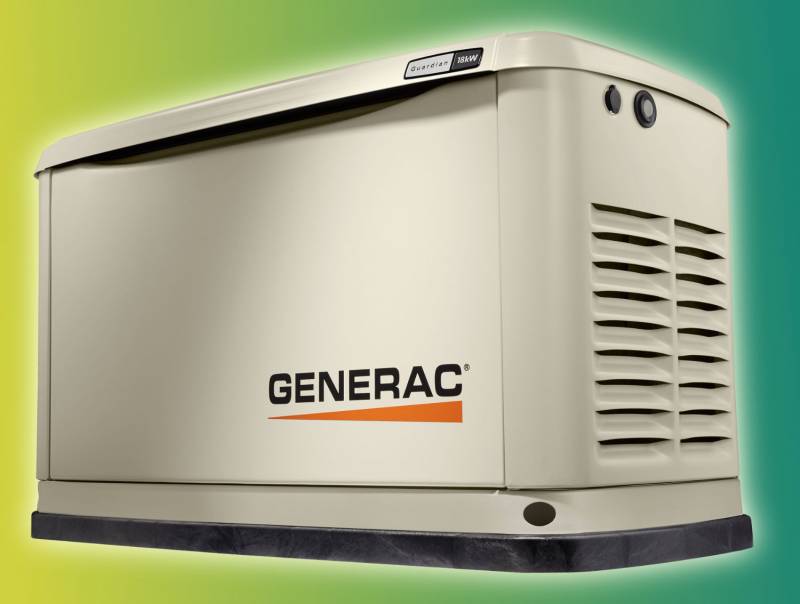
The mighty fuel generator keeps the lights on for millions of rural Americans during extended power outages.
As mentioned, we have a 20-kilowatt propane standby generator for our home. Our model is now obsolete, but it’s similar to the Generac G0073250 package, although our transfer switch is a dumb one, while the current package features a much fancier smart switch. Believe me, our Generac isn’t cheap to run, but it is reliable and can sustain us through an extended outage.
We used several hundred gallons of propane in our last weeklong outage, and the refill bill was over a thousand dollars! Then, because a generator is an engine, it also requires regular mechanical maintenance. This is another $250 annually, plus the cost in fuel and engine wear of weekly automated operation. It’s important to budget for these ongoing costs when considering a generator for your home or shop.
On top of this, there’s an unseen cost with a fuel generator: frequency. These generators produce electricity at around 60Hz, because that’s the frequency of the power grid. 60Hz is also within the audible range for humans, and because it’s such a low frequency, this noise penetrates buildings – and your squishy body – very effectively.
The end result? After about 72 hours of nonstop generator operation, I start to feel the negative physical and psychological effects of the continuous 60Hz exposure. It’s an interesting rabbit hole if you’re curious about the mechanics of this phenomenon, but suffice it to say: the frequency of rotary power generation often causes anxiety and migraine-like symptoms in those so predisposed. This can also affect animals, so it’s a very real effect.
Fortunately, we’ve found various ways of mitigating this during an extended outage, because there are half a dozen standby generators in our town now, and it is intense. I have developed a particular empathy for those who work at power plants.
For our well house, the biggest problem with this solution is the cost involved. My electrician quoted me $12,000 to install a 7.5-kilowatt standby generator with an automatic transfer switch, and this does not include the cost of a new propane tank and requisite plumbing. This is probably another $1500 or so.
Installation of a traditional transfer switch also requires a permit, because your grid connection has to be cut off by your power company to connect the automatic transfer switch, bringing the total cost of installation to around $13,500 (and the added headache of government bureaucracy).
Solar panels
Depending on where you live and your load, solar power is a genuinely viable off-grid and backup power solution. It’s especially applicable if you don’t have any high-load electrical needs. Once you start factoring in high loads (this includes heating elements, pumps, vacuums, and other electrical motors of all kinds), however, solar rapidly becomes infeasible unless you live somewhere with significant year-round direct sunlight for many hours daily, such as the American Southwest…and a lot of space.

Large electrical loads require many large solar panels because you need a lot of solar input for high-voltage charging. The Explorer 5000 Plus can accept a total of 4,000 watts of solar power through both its high- and low-voltage DC inputs. This lets you charge the battery from dead very quickly via high voltage (other reviews indicate 2.5 to 3 hours), but it also requires at least 200 square feet of space.
Solar also requires optimal conditions for peak efficiency, which means the farther north your location, the less efficient your panels are because of both the sun’s angle and its shorter duration in the sky. In the winter months, this is even more dramatic, and the real consequence of this is the need for more than the minimum solar input to compensate, which increases the footprint considerably.
Then, of course, nature is always waiting to complicate a solar setup. Our snowfall can be pretty significant (several feet overnight), which means any solar setup has to be designed to mitigate this, with either a steeper angle (which affects efficiency) or a lot of manual labor (daily snow removal).
Solar power on its own is not good for standby power, because you only have power while it’s actively converting solar energy to electricity. So, for solar to work properly, you also need one or more batteries.
Mitigating the Dangers of Lithium
In December 2024, I wrote a long piece on another site on the significant fire hazard posed by modern lithium-ion (Li-ion) and lithium-polymer (Li-Po) batteries, especially the high-load batteries found in human transport devices like scooters, ebikes, and hoverboards. Because I’m acutely aware of the dangers of high-load lithium batteries, I’ve been averse to exploring large backup battery packs.
Products from companies like Jackery, EcoFlow, BLUETTI, and Anker SOLIX use a different battery formulation: lithium (Li) iron (Fe) phosphate (PO4), also known as LiFePO4 or LFP. Crucially, the cathode in an LFP battery uses iron phosphate, which is significantly more chemically stable than the cathodes typically used in smaller Li-ion and Li-Po battery packs.
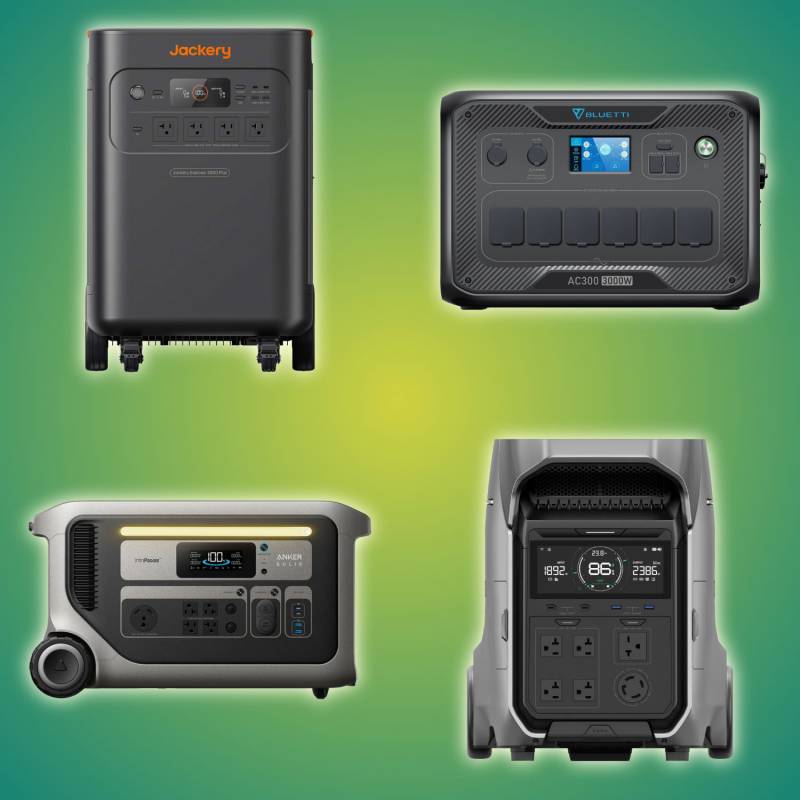
Clockwise from upper left: Jackery Explorer 5000 Plus, Bluetti AC300, EcoFlow DELTA Pro 3, Anker SOLIX F3000
The molecular structure of iron phosphate means it can withstand a lot of physical abuse (both heat and physical impact) before failing. As the chemical formula “FePO4” suggests, one molecule of iron phosphate is four oxygen atoms bonded to one iron and one phosphorus atom. This chemical bond is very strong, which means the oxygen can’t be released (in most scenarios) to fuel the battery’s fire.
These batteries are heavier and larger (about 67% more in both), but they are also much safer for permanent installations as a high-load backup power source during a power outage. LFP batteries have a very low risk of thermal runaway, which is the physical catalyst for lithium battery fires. This has dramatically reduced the direct fire risk with large batteries, as does the rate at which a compromised battery (that is, one with an internal short for some reason) releases its stored energy.
The advantages of LFP tech don’t entirely offset the disadvantages of batteries compared to traditional rotary power generation, and the added expense of enough battery power to replace a real generator is not insignificant. The scale of your battery configuration will depend on your real-world load, and the math for managing a long-term outage may or may not work in your favor when comparing the cost of a battery setup to a standby fuel generator.
Batteries can be recharged a multitude of ways, depending on the specific product(s) you own – you may be able to use high-voltage DC input from solar panels, low-voltage DC input from something like your vehicle’s battery, or standard 120V (and sometimes 240V) AC input from your power grid or portable generator.
Our Main Attraction: The Jackery Explorer 5000 Plus Power Station + Smart Transfer Switch
Jackery’s highest-capacity LFP offering is the Explorer 5000 Plus power station (with support for up to five additional battery packs), compatible with the Jackery Smart Transfer Switch (STS) for automatic failover during a grid outage. The standalone Explorer 5000 Plus unit retails for $3,499 and features the following specs:
- 5040Wh Lithium-Iron-Phosphate battery
- Expandable to 30,2400Wh with up to five battery packs
- Surge capacity: 240V@60A (14,400W) for two seconds*
- 134.5 pounds
- Grab handles and extending pull handle for safe mobility
- Built-in circuit breaker for resetting after overloading
- Temperature range:
- Discharge: 5 – 113° F (-15 – 45° C)
- Charge: 32 – 113° F (0 – 45° C)
- Smart Connectivity:
- Bluetooth
- 2.4GHz Wi-Fi
*Note: The surge capacity of the Explorer 5000 Plus is a limitation of the inverter rather than the total battery capacity. Adding a second power station adds a second inverter and thus doubles the surge capacity to 240VAC@120A; adding battery packs to a power station does not.
The Jackery app (available for iOS and Android) uses Bluetooth to configure Jackery equipment, but both the Explorer 5000 Plus and the Smart Transfer Switch prefer Wi-Fi when available.
Annoyingly, while the network controller on the Smart Transfer Switch remains continuously active, making it easy to reconnect the STS to Wi-Fi at any time, the Explorer 5000 Plus has to be fully power-cycled to turn the network on. I really would like this to be configurable. Our well house is constructed with steel siding and a metal exterior door, both of which badly attenuate all radio frequencies.
Even with an outdoor Wi-Fi access point, once the door is closed, both Jackery devices go offline. When the door opens, the Smart Transfer Switch reconnects to Wi-Fi, but the Explorer 5000 Plus does not.
Given the scenarios where this solution might be used – in a cabin, for example, where you aren’t always, or often, physically present – I really wish Jackery included an accessible coaxial connection on both the Explorer 5000 Plus and the Smart Transfer Switch for adding an external Wi-Fi antenna. With this small change, it would be very trivial to punch a hole in the well house’s wall for a reasonably high-powered antenna, and then I’d have active 24×7 monitoring year-round.
In spring and summer, things work because the door stays open to prevent condensation buildup inside the building, but in winter, everything stays closed to keep heat in for the pipes.
Power Inputs
The Jackery Explorer 5000 Plus features a variety of options for connecting incoming power sources to charge the battery. A high-quality 15A AC power cord is included for charging the battery from a standard power outlet. It’s important to always use a 15A AC power cord when charging the Explorer 5000 Plus through 120VAC – the charging circuit for the battery does not alter its load based on the size of your power cord, so using an undersized cord is a serious fire hazard. If you absolutely need to use a longer cord, make sure it is very heavy-duty, or even better, only use the included cord.
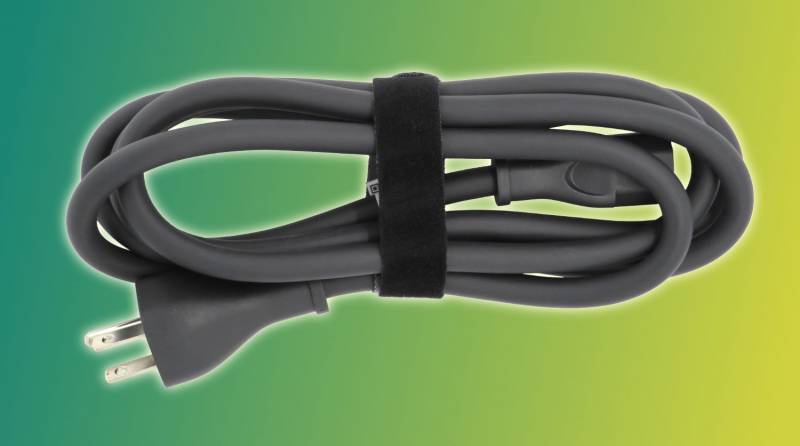
That’s a beefy cord!
The power inputs are located on the left side of the Explorer 5000 Plus. The two 8020 MPPT inputs work with both high(er) and low voltage and automatically reduce the amperage when used with a low-voltage input, like a car’s 12VDC output. High-voltage solar, which operates in the 135-450VDC range, uses a single pair of MC4 inputs. The safety lock ensures the high-voltage circuit turns off before you connect or disconnect your panels.
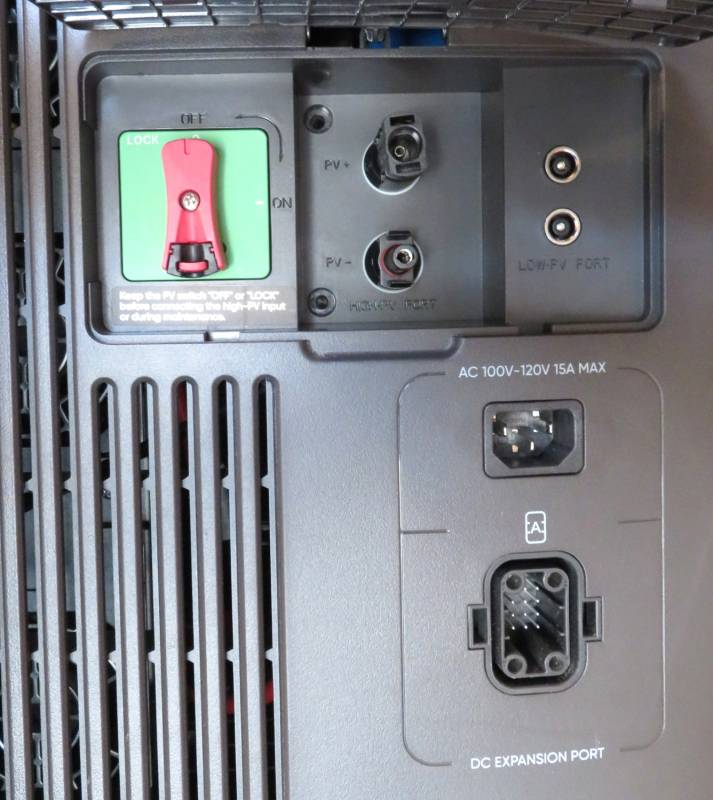
Most of the power station’s inputs are located on the right side of the unit. The Jackery 240VAC input is on the opposite side.
| Standard | Quantity | Volts | Amps | Notes |
|---|---|---|---|---|
| Jackery AC Expansion | 1 | 240 VAC | 16.7-30A | Jackery Smart Transfer Switch |
| IEC C13 | 1 | 120 VAC | 15A | Standard AC input |
| 8020 MPPT | 2 | 11-16 VDC 16-60 VDC |
8A 10.5A |
12V DC input Low-voltage solar panels |
| MC4 | 1 | 135-450 VDC | 15A | High-voltage solar panels |
| Jackery DC Expansion | 1 | 80.5-126 VDC | 98A | Jackery Battery Packs |
Power Outputs
The Explorer 5000 Plus is designed for all manner of high-load appliances and equipment. You will need to make a 240VAC power cable if your current one doesn’t use the right plug. The 240VAC outputs are on the right side of the unit.
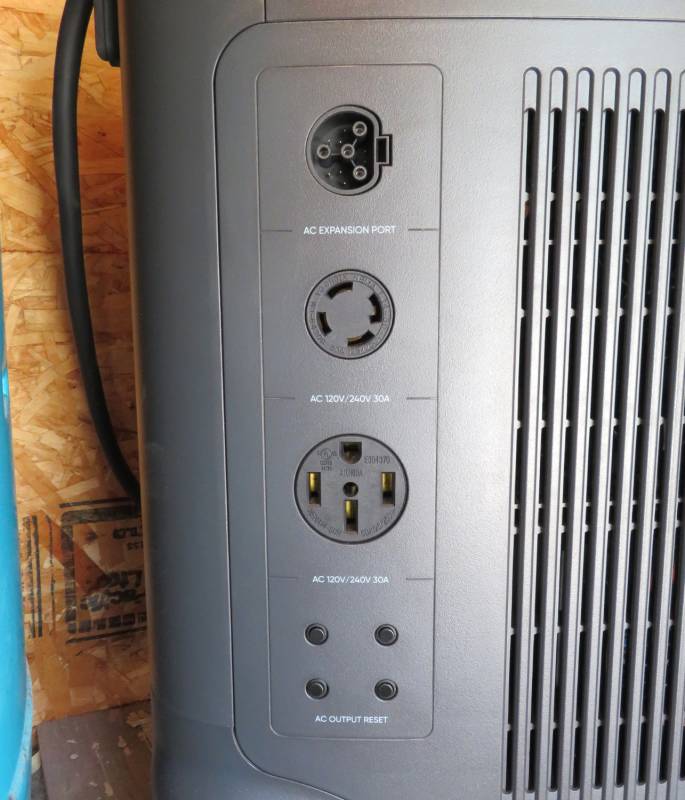
The Jackery Explorer 5000 Plus’s 240VAC outputs are located on the right side of the unit, along with the built-in circuit breakers.
Notably, the proprietary Jackery AC expansion port operates in both directions – it supplies current in a power outage and accepts current when the grid is available. The inverter manages current flow through the expansion port.
Buttons on the front of the Explorer 5000 Plus control power for the different outputs. By keeping these outputs off when not in use, you can prevent unnecessary drain on the backup battery.
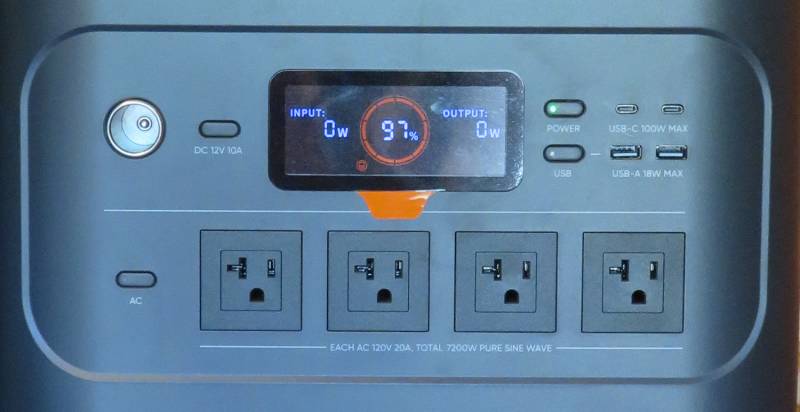
The front of the Jackery Explorer 5000 Plus features an array of useful outlets for all your devices and gear.
| Standard | Quantity | Volts | Amps | Notes |
|---|---|---|---|---|
| Jackery AC Expansion | 1 | 240 VAC | 16.7-30A | Exclusively for use with Jackery Smart Transfer Switch |
| NEMA L14-30R | 1 | 240 VAC | 30A | May be used with a manual transfer switch |
| NEMA 14-50 | 1 | 240 VAC | 30A | |
| NEMA 5-20 | 4 | 120 VAC | 20A | |
| APO | 1 | 12 VDC | 10A | Car accessory outlet |
| USB-C | 2 | 5-20 VDC | 3-5A | 100W maximum |
| USB-A | 2 | 5-12 VDC | 1.5-3A | 18W maximum |
Once the Explorer 5000 Plus is unboxed (which requires two people – it’s very heavy!), the first thing you should do is plug it in and charge it to full. Built-in fans and a smart controller ensure the battery charges quickly and, more importantly, safely. The app will notify you when the battery is fully charged – or if it runs into any problems.
On its own, the Explorer 5000 Plus is a solid option as a high-load backup battery for your household or workshop needs. The mobility and carrying options make it as easy to transport as one can expect, and the built-in display tells you everything you need to know at a glance. The image below is from a recent brief power outage. The pump happened to kick on when I went to the well house to check the hardware status, and you can see that at 90% capacity and about 2400W, the runtime is less than two hours.
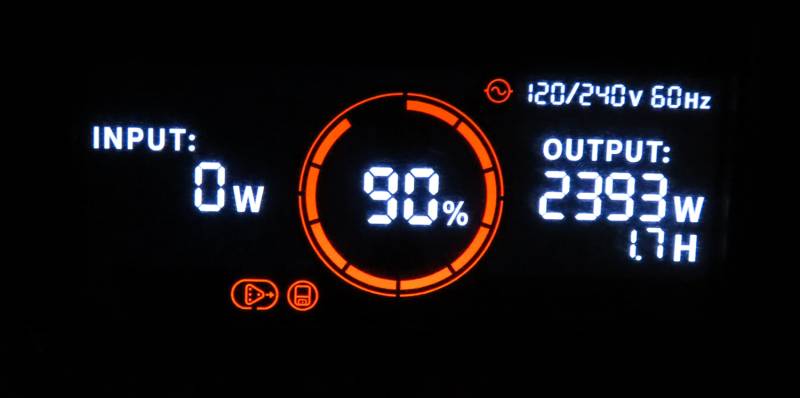
The built-in display offers detailed information on the current state of your battery system.
My biggest complaint about this product, when comparing to others in its class, is the lack of standard 240VAC input for charging the battery – this would make it trivial to charge the battery on a portable generator with a 240VAC outlet.
Instead, Jackery only allows high-voltage charging through its proprietary Smart Transfer Switch or high-voltage solar, and your solar recharge time varies dramatically. Jackery provides the following recharge estimates, assuming optimal conditions:
- 240 VAC: 1h 42m
- 120 VAC: 3h 30m
- 4000W Solar: 1h 42m
- 1000W Solar: 6h 30m
- 12 VDC: 45h*
*Note: While the Explorer 5000 Plus can technically charge on 12VDC@8A with Jackery’s car cable, the battery is too large for this to be practical for anything other than an extreme emergency or topping off an almost-full battery.
It is possible Jackery opted to go this route because portable generators don’t produce particularly clean AC power, and the transient effects of this can burn out sensitive electronic components in the circuit. Restricting the 240VAC input to the Smart Transfer Switch ensures the incoming AC is consistently clean.
Using the Jackery Explorer 5000 Plus with a Transfer Switch
If you want to use the Explorer 5000 Plus to provide backup power for all or part of your home’s demands, the best way to do this is with a transfer switch. Jackery requires a neutral switching transfer switch, so if you choose to install your own third-party unit, confirm this requirement first. Jackery offers two first-party options: the Manual Transfer Switch ($550) and the Smart Transfer Switch ($1,299).
A qualified electrician should install both transfer switch options. This is more of a requirement than a recommendation because installing a transfer switch (or subpanel) involves high-voltage power, and improper installation can easily cause a catastrophic fire. Depending on local laws, you may also be legally required to hire a licensed electrician to install the transfer switch.
Unlike a standard standby generator transfer switch, which transfers your main breaker circuit to your backup power source, both Jackery transfer switches are intended for installation as subpanels, meaning they sit behind a large breaker in your main electrical panel.
This makes it easy to control which devices use your backup battery power, so you can extend your battery’s runtime as much as possible. It also means you do not need to ask your power company to turn off your grid connection for the installation, which is less of a headache (and sometimes expense) for you.
As the name implies, the Jackery Manual Transfer Switch requires you to deliberately switch your home’s power from the grid to the Explorer 5000 Plus. Once you’ve made the switch, flip on the individual circuits you need so you don’t overload the battery. You can read more about this option on Jackery’s website.
Given that Jackery’s manual switch includes eight removable circuit breakers and is designed for a full 240VAC@50A, their asking price is reasonable. Using Jackery’s transfer switch also ensures better post-purchase support for you. If you choose to use a third-party switch, just make sure it’s neutral switching.
If your load exceeds 240VAC@50A (or 120VAC@30A), you will need to upgrade to the Smart Transfer Switch, which is rated for up to 240VAC@100A. This is an automatic switch, so it handles flipping the well house’s main breaker from grid to Jackery – and back to grid once service is restored.
The Smart Transfer Switch is so smart, it can automatically prioritize power to different circuits. The app makes this simple and clear. Priority circuits will get energy before anything else, ensuring what matters most gets the juice it needs without you having to think about it on a dark and stormy night.
The switch connects to the Explorer 5000 Plus with a thick four-wire cable rated for 300VAC@45A. This cable features locking clips to ensure it is securely attached on both ends. Squeezing the plug as you remove it releases the clip.
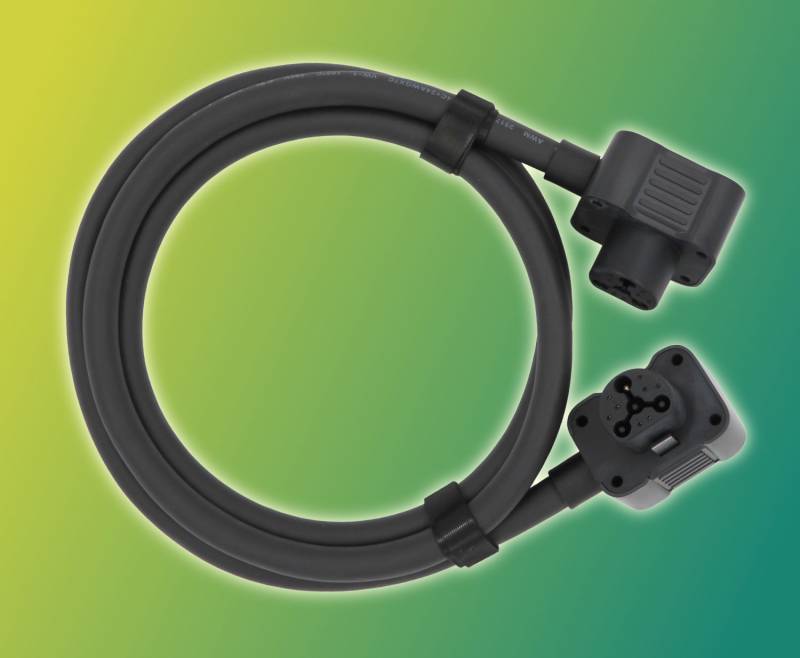
The Jackery Smart Transfer Switch includes one 300V@45A proprietary power cable for connecting the Explorer 5000 Plus.
The Smart Transfer Switch features two receptacles, which means you can use two Explorer 5000 Plus units for more power. Double the units means double the fun – you can sustain a full 14,400 watts of electricity, which means 240VAC@60 amps!
Note: The Jackery Smart Transfer Switch has a 100A main breaker, but this is for grid power. The Explorer 5000 Plus tops out at 60A when using two units in parallel, and the built-in breaker for the DC-AC inverter enforces the 60A limit.
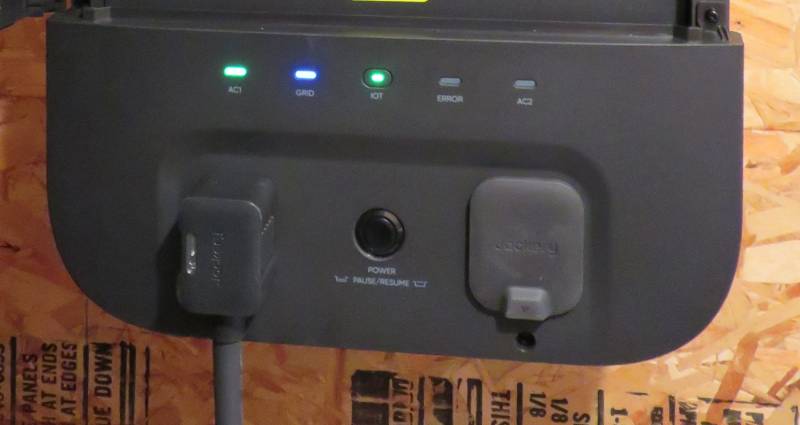
The Jackery Smart Transfer Switch features two receptacles for the Explorer 5000 Plus. The middle button shuts off these connections immediately in an emergency.
Importantly, the Smart Transfer Switch isn’t designed for simultaneous 240V and 120V AC input, so if you need to charge the Explorer 5000 Plus using its included AC cord, unplug its connection to the STS first so the battery’s inverter is in the correct operational state for 120VAC charging.
Side Quest: Mathing Out Your Needs
As I mentioned from what feels like an epoch ago, backup power costs start piling up when you’re dealing with high-load requirements. Although two Explorer 5000 Plus units with a Smart Transfer Switch will give you 240VAC@60A, that power will still last a couple of days if you’re lucky and don’t have too many high-load appliances in your home.
To put it into perspective, our 20,000-watt Generac generator gives us [email protected]. It lasts a week (or longer) on 500 gallons of propane, powering a large household with computers, multiple fridges and freezers, and other high-load devices. You can also add more fuel regardless of environmental conditions, as long as our propane supplier can make it to town safely. If you use natural gas instead, the available amps drop slightly to 75A, but no fuel delivery is ever required.
The footprint required for a propane tank and a generator – plus the additional labor to install everything, which requires both plumbing and electrical competency – is nothing to sneeze at, and you need enough outdoor clearance for both, along with the always-present hazard of keeping what amounts to a bomb on your property. Propane costs vary daily, while regulators set your power company’s base rate and changes only every few years.
If you use a lot of energy all the time and don’t live where high-voltage solar is highly viable year-round, a battery setup will be expensive, especially if you need enough capacity to float a weeklong outage. The Smart Transfer Switch ($1,299) plus two Explorer 5000 Plus units ($6,998) and ten batteries ($28,990) will set you back over $37,000! Suddenly, installing a large fuel generator doesn’t seem so terrible.
For a small application, however, the cost and footprint of a generator versus Jackery’s solution may not be worth the trade-offs. Both the Explorer 5000 Plus and the Smart Transfer Switch easily fit inside the well house, and in an extended winter outage where even our planned backup solar solution isn’t viable for keeping the battery charged, we can always bring the Explorer 5000 Plus into our home to recharge off our Generac from a regular wall outlet.
Installing the Smart Transfer Switch
In the United States, Jackery partners with a third-party service contractor, Qmerit. This company handles the logistics of finding a licensed and bonded electrician who knows how to install modern high-load products, such as 240VAC EV chargers and smart electrical panels. Qmerit’s service depends on available electricians, so depending on where you live, you may be outside Qmerit’s service area.
We went with an area electrician who installed our neighbor’s Tesla supercharger, since we could see the quality of his work for ourselves. Our electrician has over forty years of experience and has done large contracts for state and county agencies, as well as residential service, so he was well qualified to perform the installation.
The total bill was $1,000 for the Smart Transfer Switch installation, bringing the total cost of hardware and installation to $5,798. This is still less than half the cost of a propane tank and standby generator installation.
The Jackery Smart Transfer Switch includes some, but not all, of what you need for complete installation. A 100-amp main breaker is preinstalled, but it includes no other breakers. The box also includes metal brackets for wall mounting, plus a large paper template for clean, level installation. Your electrician will need to cut open an access point for wiring from the STS to your main breaker box. The enclosure has no punchouts, so make sure your electrician is skilled at his craft.
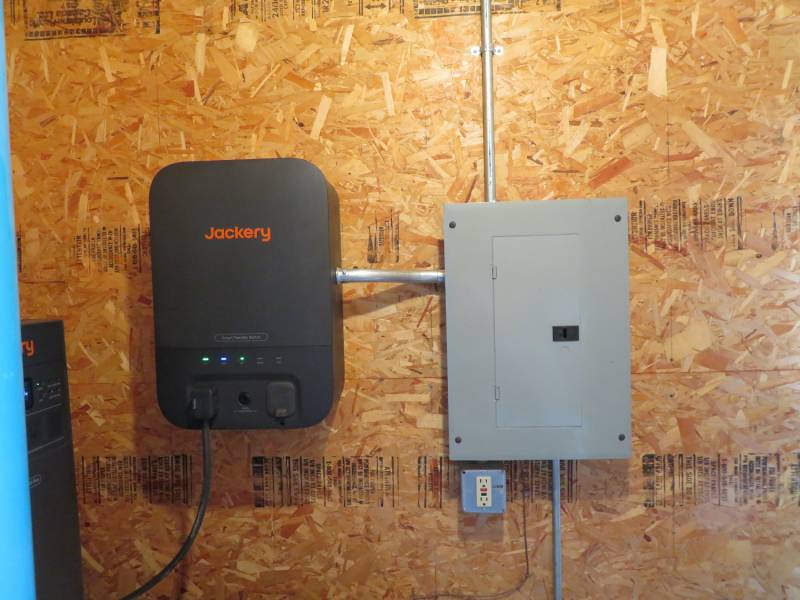
The Jackery Smart Transfer Switch is installed as a subpanel, behind our main service breaker.
The STS includes a 100A dual-pole main breaker and twelve breaker slots. No additional breakers are included. Our well house has a single-bulb indoor light fixture, so we added a breaker for that circuit. Because the building is heated with a plug-in radiant heater, no circuit is needed. The heater plugs directly into the Explorer 5000 Plus.
Conveniently, the panel faceplate is easily removed with two captive thumbscrews.
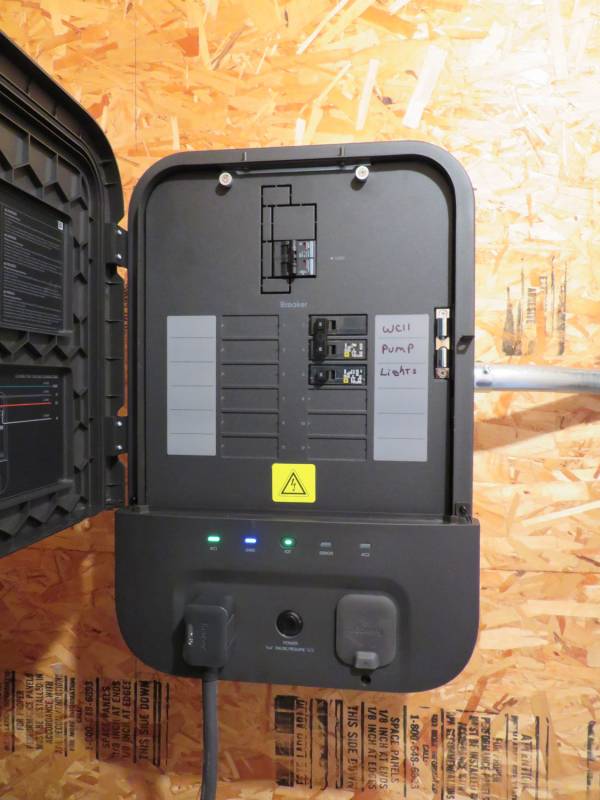
The Jackery Smart Transfer Switch panel is clean, with enough room for easily legible labels.
The row of LEDs below the breakers indicates the STS’s current status and its connected power source(s). LEDs at both ends indicate the status of the two Explorer 5000 Plus receptacles. These are illuminated green when connected and blue when actively in use – either to charge the battery or to feed the STS’s circuits from the battery.
The GRD light (blue in the above photo) illuminates blue when the power grid is online and turns off when the grid goes down. The IOT light, in the middle, blinks green when disconnected and illuminates green when connected. The ERROR LED illuminates red if it detects a problem, which means you should check the Jackery app for more details.
The Jackery App (iOS)
I don’t really use Android devices much, so I’ve been managing my Jackery setup with the official iOS app. (You can find the Android app over here.)
Like pretty much everything “smart” these days, Jackery’s app requires authentication to work properly. This means if Jackery’s backend services ever go offline, the app will be effectively disabled. Once registered, the app makes it easy to add devices using Bluetooth Low Energy (BTLE).
Just hold your phone reasonably close to your Jackery equipment, and the app does the rest (with some confirmation from you). Once added, your equipment will appear in the app regardless of its Wi-Fi connection status. Without Wi-Fi, however, the app won’t be able to do a whole lot.
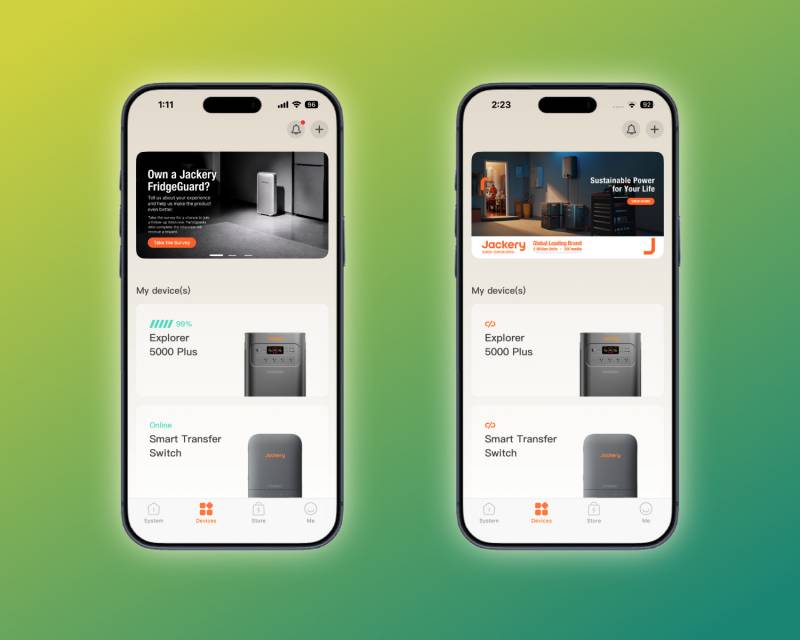
The Devices view shows all your configured Jackery products.
The advertising carousel at the top of the Devices view is super annoying. Nothing Jackery sells is inexpensive, and I don’t like it when companies that have already taken a lot of my money are jonesing for more. It also uses space to advertise customer feedback surveys, which I appreciate, but this could go below the device list rather than prominently at the top of the view.
The Jackery Explorer 5000 Plus view includes basic information about the power station, including when it’s in use. Displayed next to the Input and Output labels are the active load (incoming or outgoing) and remaining hours at the current load. You can disable and enable the front panel output circuits from the app, which is handy.
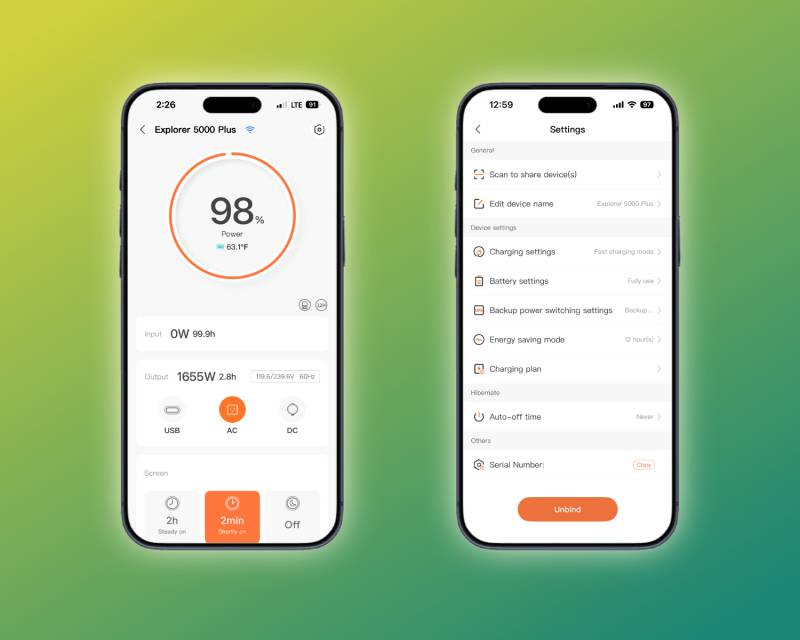
The Explorer 5000 Plus offers a variety of options for getting the most out of your power station.
When you connect the Explorer 5000 Plus to the Smart Transfer Switch, it flips into a locked configuration. The configuration options are poorly documented, so I’ve listed them here. Bold options are defaults; italics denote the locked STS configuration’s options.
- Charging Settings
- Fast: Uses the maximum available supply. When not using the STS, tapers down the last 20% to reduce battery wear.
- Quiet: Runs at about 1400W, which significantly reduces cooling fan noise.
- Emergency: Same as fast, but with no taper.
- Battery Settings
- Battery Saving Mode
- Full Use: Makes the full battery capacity available for charging and discharging.
- Battery Saving Mode: Caps charging and discharging to reduce battery wear. Not available when using the STS or with one or more expansion batteries connected.
- Auto Shutdown Time: Defaults to two hours and can be configured never to shut down the power station. The STS sets this to Never.
- Battery Saving Mode
- Backup power switching settings*
- Backup UPS: Grid power passes through with ~20ms latency to transfer to battery if the grid goes down. Permits use of 240VAC outputs. Not used with the STS.
- Online UPS: True UPS functionality, with no-latency transfer. Only supports the front panel outputs. Not used with STS.
- Energy saving mode: Enabled by pressing and holding the AC and Main power buttons on the power station. Shuts off outputs after a configurable time limit if no load is present. Not used with STS.
*Note: The Smart Transfer Switch UPS configuration manages the Explorer 5000 Plus while it’s connected.
The Jackery Smart Transfer Switch has more options and features than the Explorer 5000 Plus. The main view shows the current status of both the incoming grid and outgoing home current. When one or more circuits running through the STS have an active load, this view reflects the total load across all active circuits. The main view also shows total power consumption from various sources, as well as solar generation. Below this section is a list of quick access configuration options.
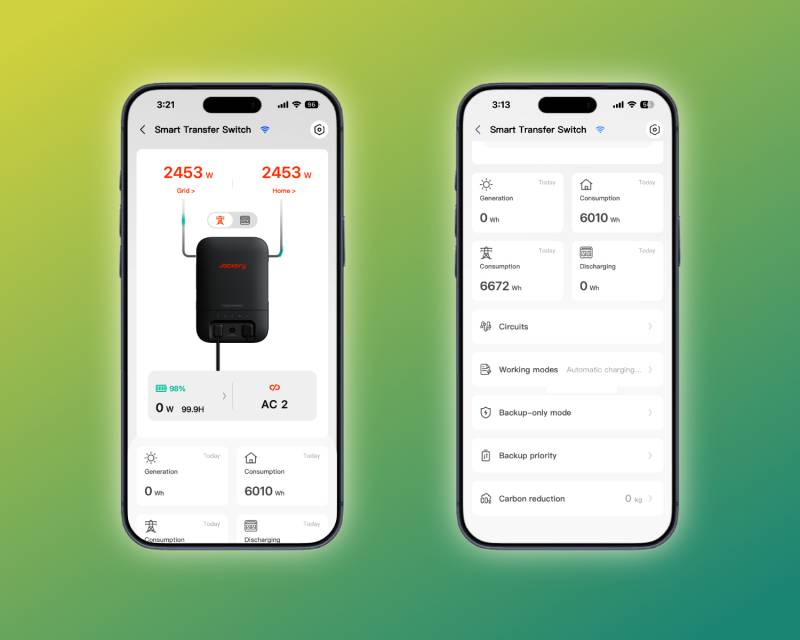
The Smart Transfer Switch view shows status and consumption information for the STS’s circuit panel.
The Circuits view makes it easy to monitor every circuit the Smart Transfer Switch manages. The separate Backup priority view lets you configure which circuits to prioritize during an outage. This concept is known as load shedding: unnecessary electrical loads are taken offline so all remaining available energy is reserved for critical circuits. In our case, we only have two circuits, and the second one – a single LED light bulb – is a very small load compared to the pump.
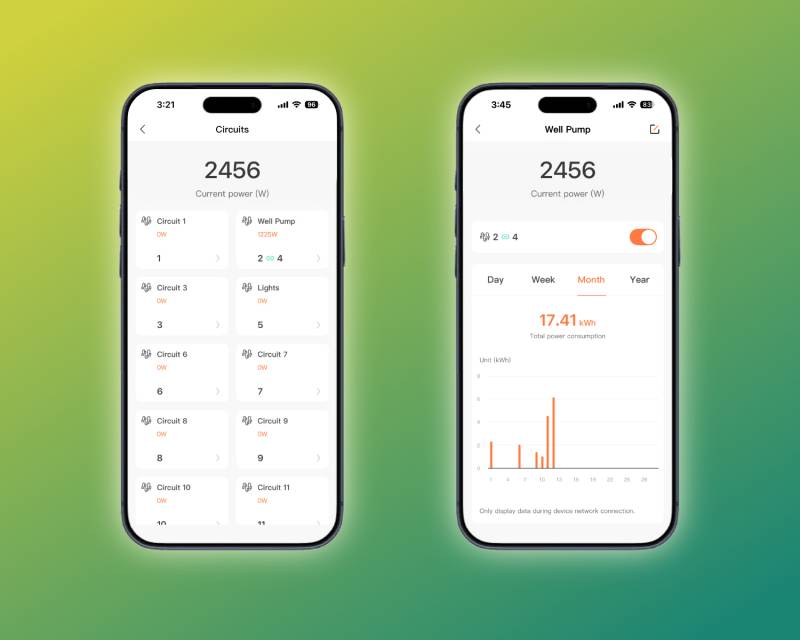
The Circuits view makes it easy to see which circuits use the most energy.
This view does not show historical data. You can see data for the current day, week, month, and year, but you can only view historical usage data for the Smart Transfer Switch’s entire load, the service load, and any battery load from an outage. I think this is probably because per-circuit historical logs would take up a lot of storage, and Jackery’s logs appear to be stored on the device.
It would be excellent if Jackery added a REST API to its products, which could enable automatic backups of detailed daily circuit load logs to a connected server (or even to your phone’s storage through the Jackery app). Those of us who are particularly amused by statistics and playing with data would appreciate this functionality.
You’ll notice the above screenshot shows a dual-pole circuit for the well pump. This is easily configured under the Smart Transfer Switch’s settings page.
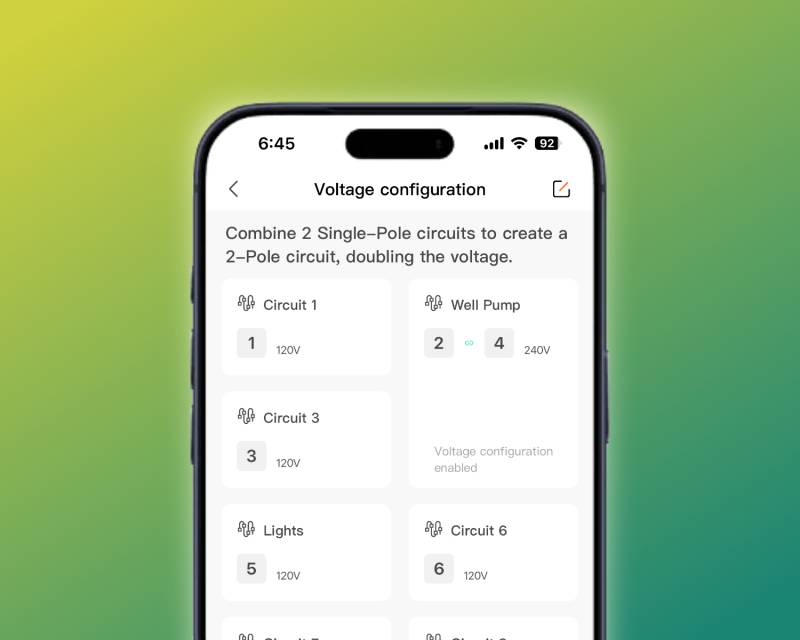
It’s easy to label your circuits and configure which are dual-pole.
Smart Transfer Switch Operation
The Jackery app has several sections for the Smart Transfer Switch, and none are particularly well documented, so we’ll cover everything here. This helps you understand how the Jackery Explorer 5000 Plus power station and Smart Transfer Switch operate under different conditions.
UPS Mode
UPS mode is most important for your power bill. When this is enabled, the Smart Transfer Switch runs all connected circuits through the Explorer 5000 Plus. This allows very rapid circuit transfer during a power outage, but it is not instantaneous. Because the mechanical relay switches the circuit between grid and backup, the transfer has a delay of around 20ms. Additionally, if the Smart Transfer Switch is actively charging the battery when the grid goes down, this delay increases to around a second because of how the AC-DC inverter functions.
When the Smart Transfer Switch’s load is always running through the battery, there are three negative consequences:
- This inevitably adds more wear to the battery. Since the battery has an advertised lifespan of eleven years, the nicer you treat it, the more likely you are to hit that goal.
- Using the power station limits the total load to 30A, rather than the panel’s 100A rating. This can be doubled to 60A by adding a second Explorer 5000 Plus.
- The AC-DC-AC power conversion is expensive. Total energy loss is around 15-25%, which means you’re paying more at the power meter for the same energy your load consumes.
For these reasons, it’s a good idea to leave UPS mode disabled, unless you know a storm’s a-brewin’, and you need that short transfer delay. When this mode is disabled, the standard transfer delay is five seconds, which is still short compared to Generac’s estimated 10-30 seconds from outage to online (most of this delay is waiting for the engine to get to full speed and stable voltage).
Charging-Discharging Plan
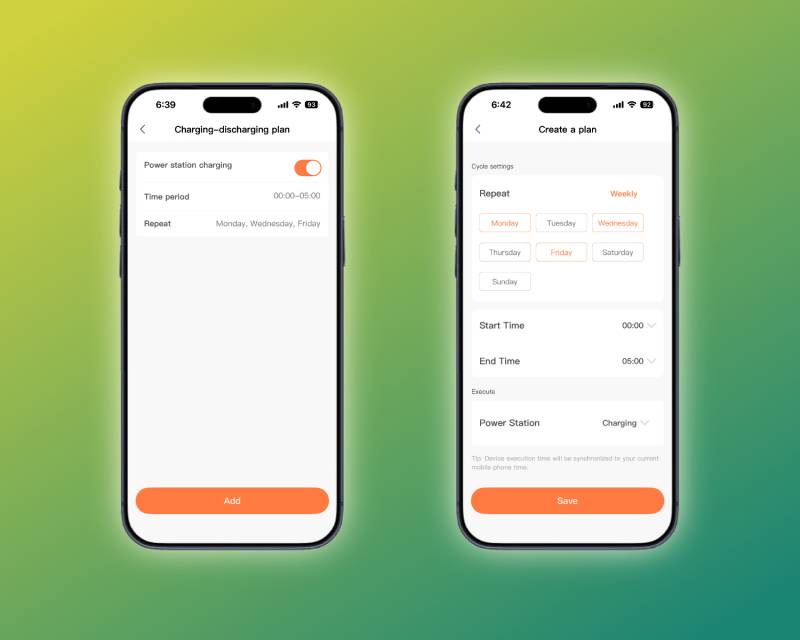
Charging-discharging tasks make it easy to take advantage of off-peak utility rates.
This feature is especially useful if you live in a locale that uses peak and off-peak rates. By scheduling when the Explorer 5000 Plus draws power from the grid, you can reduce its impact on your utility bill.
Backup-Only Mode
This mode ignores your charging-discharging schedule, if set, to ensure the battery is fully charged to 100% and ready for emergency use. It also disables the toggle between grid and battery from the main Smart Transfer Switch view in the Jackery app, so you don’t accidentally consume your battery right before an outage.
Automatic Charging Mode
This is the Smart Transfer Switch’s default behavior. Its circuits use the battery until it drops to the reserve amount, then the STS begins charging from the grid.
Self-Powered
This setting is used with solar panels. When solar power is plentiful, you can choose to run the STS off the Explorer 5000 Plus any time the battery has been charged from a connected solar array. Like UPS mode, this limits the total load to 30A. Because of how the inverter functions, using Self-powered mode while actively charging the battery cuts the total available amperage to only 15A. Both limits double if you add a second Explorer 5000 Plus.
Backup Reserve
A single setting controls how these modes handle battery discharge and recharge. The slider controls how much of the battery’s total capacity is reserved as backup power. If UPS mode is inactive and the grid is online, the Explorer 5000 Plus will not consume any power, and the battery won’t discharge. This setting applies only when you’re deliberately using the battery.
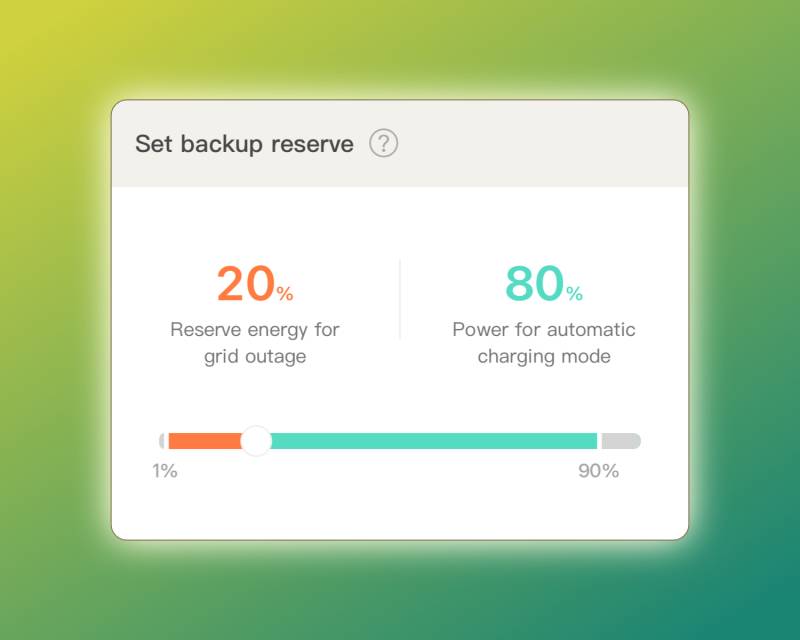
The backup reserve setting takes effect when the battery is in use.
I found this slider a little confusing. The gray regions at the beginning (0-1%) and end (90-100%) indicate the battery’s safety margins. A minimum of 1% of the battery will always be held in reserve; a minimum of 10% will always be available for normal use. If you frequently use the battery while the Explorer 5000 Plus is connected to the Smart Transfer Station and you set this slider too high, you’ll draw extra grid power to keep the battery charged to the reserve amount.
Backup Priority
This configures which circuits get priority during a power outage. The Smart Transfer Switch supports two tiers for your enabled circuits: Must have and Nice to have. Move anything that can be shut off during an outage to the third section, Non-essential circuits.
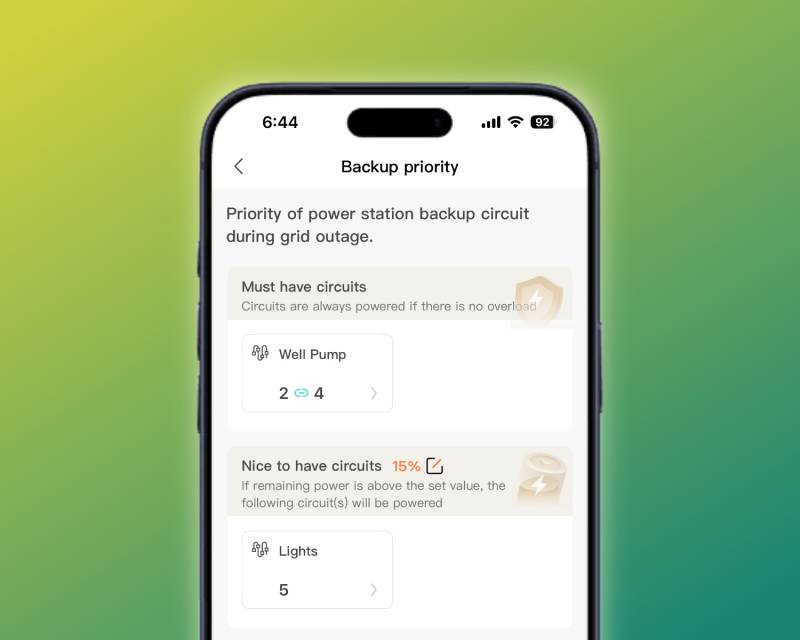
You can prioritize circuits so your important loads always have power during an outage.
Would you believe you made it to the end? I hope we’ve covered everything you might want to know about Jackery’s standby backup power solution.
What Remains to be Seen
It’s just about the end of summer up here in the mountains. We’re still getting nice daytime temperatures, but evenings are already in the low-mid forties, and we’ll be seeing freezing temperatures after sundown before long. Although LFP batteries are less sensitive to environmental changes, they are not immune, and I don’t yet know how this Jackery solution will handle an outage in the dead of winter.
This Jackery solution was installed at the end of August 2026, so we’ve had less than four full weeks of use. It’s very hard to know what our real-world energy consumption will be during a winter outage. I just don’t yet have enough data to make any reasonable predictions about future daily usage.
In Spring 2027, I’ll be posting an update on how well this solution worked over the winter. We’ve had at least one outage lasting more than 24 hours every winter since we’ve lived here, so I expect I’ll have a chance to really exercise the Explorer 5000 Plus’s real-world capacity once the snow starts falling.
Our current emergency plan for future extended outages has two options: solar and 120VAC. We have access to an 800W solar array on our friend’s camper. If we can keep daily consumption as low as possible, we might be able to keep the battery charged enough to hobble through a weeklong outage without using the second option: 120VAC.
This entails unlocking and removing the Explorer 5000 Plus from its home and bringing it into our house, so it can recharge off our Generac. At 134 pounds, this isn’t exactly trivial, especially in the dead of winter, when strength and dexterity tend to be more of an issue, but it’s workable when we need it.
For now, I’m pretty confident this solution will get us through power outages with the glorious luxury of running water, and I’m very happy about it.
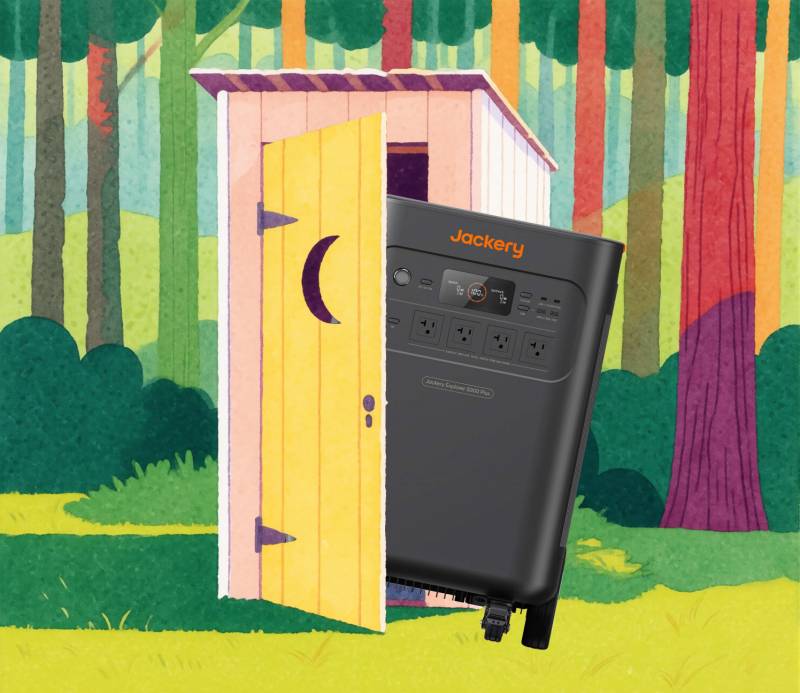
Running water in 2026? The Jackery makes it possible! (Background: Krea2)
Final Thoughts
Jackery has created a very interesting backup power solution with the Explorer 5000 Plus power station and Smart Transfer Switch. As of this review, only EcoFlow offers a similar option, with their Smart Home Panel 2 ($1,599) and high-load power station products. Full 200A service-level smart panel replacements are available, such as the SPAN Panel MAIN 32, but they cost considerably more.
I do not think this class of LFP products adequately replaces a traditional generator for whole-house residential backup power. To meet the average family’s modern expectations, you’ll need to spend nearly $40,000 on hardware, and that’s a lot. If an outdoor standby generator is an option for your home, it is ultimately significantly more affordable and maintainable over a longer period of time – as an engine, your generator needs only routine maintenance to ensure several decades of reliable service.
If you have a situation similar to mine, however, where you need to provide backup power to a small-ish load in an emergency, the Jackery solution can be viable. I can see this combination being really useful in a large workshop or other outbuilding, where you want reliable backup power for smaller loads (such as lights, security cameras, and Starlink) but also want the portability of the Explorer 5000 Plus for use with welders and other 240VAC equipment anywhere on your property – and elsewhere, like for an emergency off-road repair.
You’ll get the most out of this solution if you live in a region where the sun shines brightly 365 days a year for hours, enabling rapid, free battery recharging. If you don’t have such a benefit where you live, that’s okay – if you already have a high-load solar array at your disposal, you can use solar just about anywhere for at least a little extra energy each day.
I really like the hardware itself. Everything looks and feels well-made, and my electrician, who has over four decades of experience in both residential and commercial work, had no complaints about the Smart Transfer Switch’s interior wiring. The installation documentation was easy for him to read, and he had no questions, so I’m confident a competent electrician can use the wiring diagrams and instructions to complete the installation safely.
I’d love to see more network connectivity options in the next generation of this hardware. I can’t really use Wi-Fi reliably with my setup, so the ability to add either an external antenna or a USB adapter would be excellent.
My single biggest complaint about this solution, though, is Jackery’s lack of documentation on the numerous options available through the mobile app. Some features are documented in the user manual, but others are only available online (and sometimes only revealed on sites like Reddit, where owners post information that support sent them), and nothing is collected in a knowledge base.
I really want to see Jackery produce quality documentation, because their products have expansive and rather complicated features, and users need to understand the actual implications (estimated grid power consumption) of the various options available with each Jackery product. Every feature needs a clear explanation of its functionality, including power consumption implications and differences in functionality when using the Smart Transfer Switch.
This is my first LFP product, so I can’t say how it stacks up against the competition. My parents have a couple of EcoFlow batteries to keep their cold food storage running during extended outages, and they’re really happy with them; our neighbors also own a couple of Bluetti units and haven’t complained about them. I’m happy enough with this initial experience to recommend including the Jackery ecosystem in your backup power research, but we’ll just have to wait and see how things play out this winter.

The Jackery Explorer 5000 Plus retails for $3,499; it is available directly from the manufacturer and other retailers, including Amazon. The Jackery Smart Transfer Station retails for $1,299 and is also available from Jackery and Amazon. They are also available as a bundle for $4,439 from Jackery and Amazon.
What I Like: Per-circuit monitoring and control; Rated for 100A; Well-made and robust
What Needs Improvement: App needs complete documentation; Network connectivity is inflexible for atypical installations



Be the first to comment on "Jackery Explorer 5000 Plus Power Station with Smart Transfer Switch Review: Serious Backup Power for When the Grid Goes Dark"