
 Larry: In case you missed my post from last week, I’ve started the Couch to 5K running plan. Or as a few of us at Gear Diary have turned to calling it, the “Blogger’s Chair to 5K” running plan. This running program helps you get from doing little or no exercise to running a full 3.1 miles in 9 weeks.
Each week I’ll be updating the site with a post about the program, how the week went, some of the gear I used and more.
Surprise #1: After I posted my initial article I got messages from both Dan and Judie. They both wanted to take part in the program too. Judie used to run in high school and off and on up until about 10 years ago. But from what I gathered, Dan hasn’t been much of an exerciser … ever. Unfortunately, Dan’s participation in the program was short-lived. He had major wrist surgery last week and even though he thought he could manage, he has still been feeling the effects, so his doctor gave him a thumbs-down on running.
It’s always better when you have a partner in something like this. Someone to share your pain with, so I was thrilled to have them both join in the adventure, even if Dan’s part was short-lived. Hopefully he will be able to join again after healing.
 Judie: I agree that a partner helps to keep you motivated (and accountable!), so if I was going to start running again this was probably the best way — maybe the only way I could (or would) do it! When Larry and Dan were talking about getting started, and Carly was talking about how she is already running, I couldn’t help but feel the excitement and then I ultimately bowed to peer pressure and said I would do it, too! I’ll admit that the minute I agreed to do it, I had immediate misgivings because starting any new exercise program is a pain, but starting to run from scratch — which is essentially what I would be doing — totally sucks.
Larry: This week’s plan consisted of three workouts, each exactly the same.
-Five minute brisk warm up walk
-Alternate 1 minute of running and 90 seconds of walking for 20 minutes
-Five minute cool down walk.
Having been a runner for a few years (just not of late), I figured these initial workouts would come quite easy and that was mostly the case. I woke myself up early Monday, Wednesday and Friday and got them done. Then I sent encouraging emails to Judie and Dan.
I think that the mix of walking with running makes the transition from sofa to running much easier.
Judie: Okay so here is my sob-story: I came down with a sinus infection on Saturday, and since I had already committed to doing the program, and since I was totally feeling the peer pressure, I went ahead and started on Monday. The walking and running – limited as it was – really kicked my butt. However, I am proud to say that even after getting two shots in the aforementioned butt and starting antibiotics on Tuesday, I still managed to run on Wednesday … and Friday. Never underestimate the power of peer pressure, I am telling you!
Larry: To assist with the program, Judie and I have downloaded the iPhone OS application C25K, her onto the iPhone and me onto my iPod Touch. This week I used it along with the Nike+ program. The C25K program offers audio commands for when you should be doing each part of the workout. Mixing all the different components in such short intervals can be a little confusing. Simply forgetting about it and doing whatever the application tells you to do is much easier.
What the C25K application doesn’t do is track speed and distance. That’s where the Nike+ applications comes in. I used it, along with the Nike+ chip on my shoe to take care of that.
Judie: I am not even concerned with speed or distance yet, I just want to start running without wheezing like an out of shape blogger! So I am simply using the C25K app.
Larry: I’ll talk about using Nike+ another week. Today we’ll focus on the C25K application.
The C25K application is very simple. To begin, use the slider located at the bottom of the screen to select the workout you’re on. There’s a break down of each day’s workout explained at each screen.
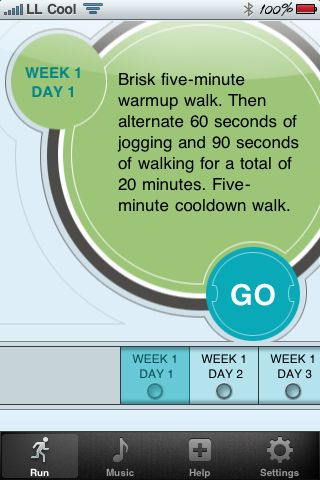
When you’re ready to go you simply slide the start arrow and your workout commences.
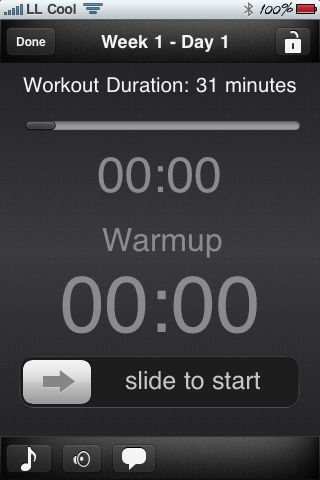
Your progress is tracked by the app, and once you begin you’ll notice that the font color changes to a bright yellow color. This makes seeing it very easy. That’s important when you want to glance down and see where you are in your workout. I strapped my iPod Touch to my arm and therefore appreciated this feature even more so.
Judie: Since I wasn’t really prepared with runner’s gear – much less a decent pair of shoes – to start working out this week, I didn’t have anything to carry my iPhone in but a pocket one day and my hand on the other two. It actually wasn’t too bad making do, but I am glad Dan is sending me a wrist pouch for my iPhone, as I am sure that sweaty hands aren’t the best thing for its Miniot wood case. 😛
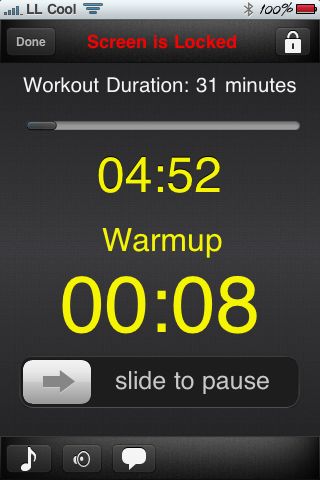
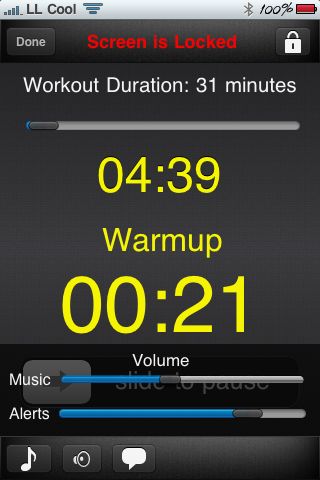
Larry: The application gives you spoken commands which are proceeded by a series of beeps. So for example, you start by doing a five-minute walk. Three seconds before the 5 minutes ends (at 4:57) you’ll hear three quick beeps, and then the applications tells you “RUN.” You run for 1 minute, so at 57 seconds you’ll hear three quick beeps followed by “WALK” at which time you walk for 90 seconds, and so on.
Judie: I love this feature! I wasn’t able to quite wean myself from looking at the screen, but I like the idea that once I have (hopefully) quit feeling the urge to see how many seconds (or minutes) are left on a run segment, I’ll know exactly when it is time to switch from a walk to a run and back again. Although, if I’m honest I’ll admit that calling what I do “running” is a bit of an over-statement; I am not running, I am jogging.
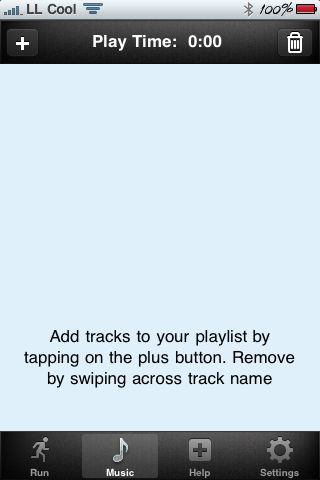
Larry: You can also add your own music to listen to while running. Creating a playlist within the application is done just like you’d do in the iPod application. The application lowers the volume of the music when it’s time to for your commands.
And it allows you to set different volume levels for both your music and your alerts.
Judie: Working out with your favorite music is definitely a positive motivator, and I am glad that the program uses music that you already have and enjoy.
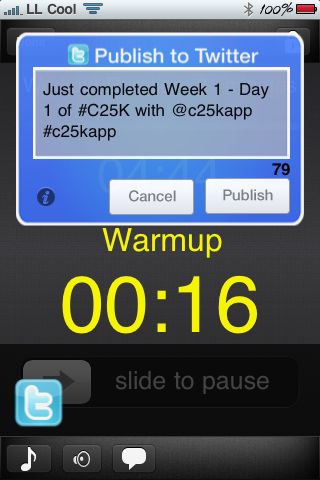
Larry: After you’ve finished your workout, you can send a tweet to your followers letting them know you did it. The application also works with Facebook, and you can choose to update your status with news of your completed workout there, too.
Judie: This is the best part – the sense of accomplishment you get when you push the Tweet button, and you know that your friends are going to read it and cheer you on. I hope that they will also pay enough attention so that if I were to lapse and not run on a Monday, Wednesday or Friday, they would ask me what was up. 😉
Larry: I found the application very simple to use and actually quite helpful. Often times I didn’t even need to rely on the spoken commands but just used the audio alerts and a cue for what to do next. I never questioned what it told me to do, I just did it. The application does exactly what it says it’ll do. I like the fact that it allows me to listen to my own music and that it automatically lowers the volume when it comes time to tell me a command. My only complaint is a lack of GPS functionality, which is why I’m using the Nike+ app. too.
Judie: I had no idea what to expect when I downloaded this app; somehow I missed all the internet chatter about C25K, and I had no idea there was anything like this out there. Now that I have started, I can’t yet say that I am hooked, but I can definitely say that I intend to keep doing it.
The C25K application is available in the iTunes App Store for $2.99. You can get it by clicking here (link open iTunes.)
You can learn more about the c25K program here.




Ol’ Doug is doing it, too, although I’m 1 workout behind these two maniacs. My story is that I did competitive sports–baseball, softball, ultimate, swimming, fencing, and soccer–until my mid-30s. Then I had a neck disk that needed to be removed, and I had to stop. But I’m sick to death of being shaped like a Bosch pear, so I’m giving it a try. And I *hate* “running”. But I’m wheezing my way through my first week (always the hardest). Looking forward to those happy post-exercise endorphins.