
The Lowdown
The CRKD ATOM is a clever little gadget. As a keychain gaming controller, it delivers the one thing it needs to: portable physical controls that are easy to take anywhere. It’s cute, pocketable, simple to pair with, and it works well enough with iPhone gaming to be genuinely useful.
Overall
Pros
- Extremely small and travel-friendly
- Includes charging cable, guide, and lanyard
- Easy Bluetooth pairing with phone/tablet
- Works well for games that support controllers
- More satisfying than on-screen controls for mobile gaming
Cons
- The tiny size may limit comfort for longer gaming sessions
- Buttons may be too tiny for some fingers
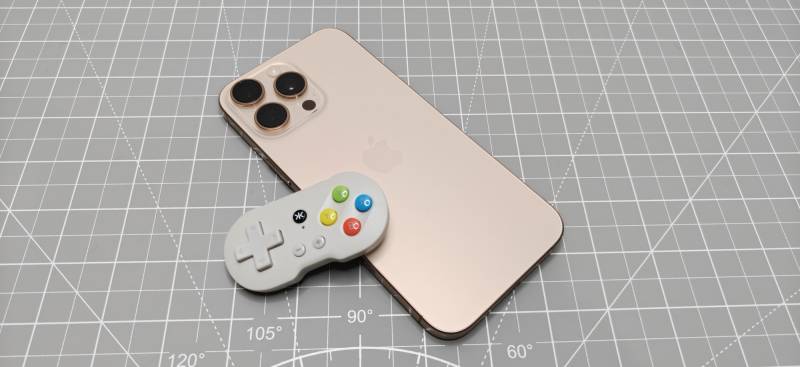
If you like mobile gaming but don’t want to carry a full-size controller everywhere, a keychain gaming controller like the CRKD ATOM is a fun idea. It’s tiny, Bluetooth-enabled, and small enough to slip into a pocket or bag when you’re traveling or just heading out to an appointment. I took a look at what comes in the box, how the controller is laid out, how pairing works with an iPhone, and whether this miniature controller is actually usable in a real game.
What Is It?
The CRKD ATOM is a miniature Bluetooth keychain gaming controller designed for portable play. It’s meant for situations where you want physical controls for your phone but don’t want the bulk of a standard controller in your bag.
What’s Included?
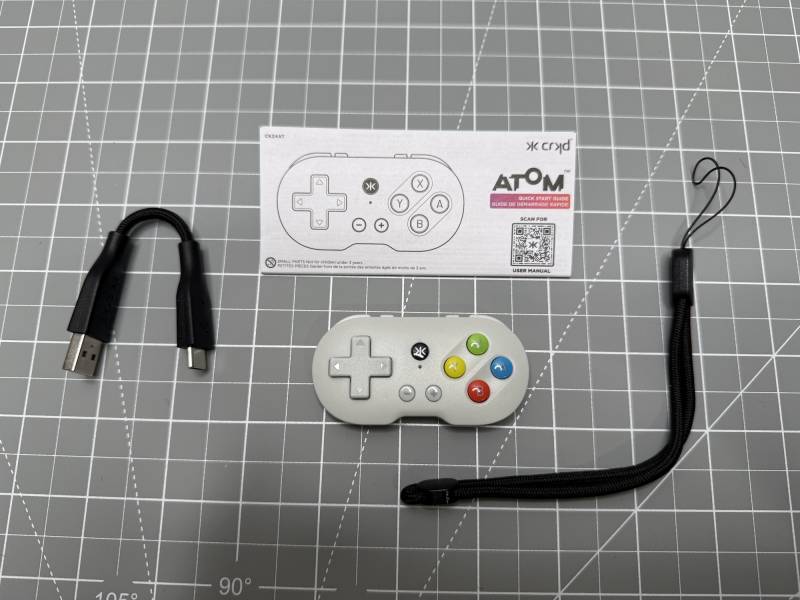
- CRKD ATOM controller
- Quick start guide
- USB-C to USB-A braided charging cable
- Lanyard
First Impressions
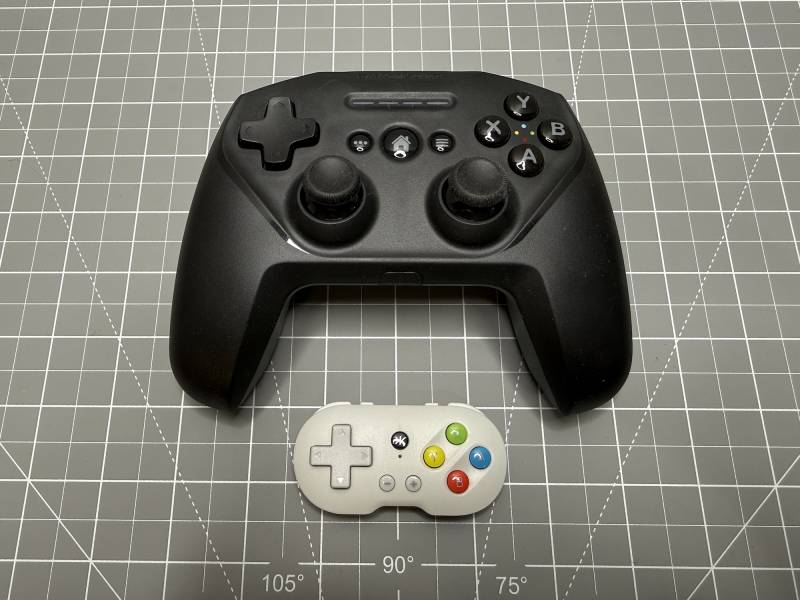
The first thing that stands out about the CRKD ATOM is the size. Especially when you compare it to a regular-sized controller. This controller is genuinely tiny, and that’s really the whole appeal. It feels like the kind of gadget you’d carry in your pocket, clip to a bag, or keep handy for trips when you want better game controls without carrying bulky gear. I don’t know about you, but I prefer real buttons to onscreen taps. I feel like I can play better with a physical controller.
The CRKD also has a playful look to it. The body is compact and rounded, with a classic gamepad layout shrunk down into an almost toy-like form factor. In addition to the color you see here, CRKD offers the ATOM in other colors. They are going for a collectible vibe. Cute is definitely the right word here, but it’s not just novelty. The design is clearly intended to be functional enough for quick gaming sessions on the go.
Design and Controls
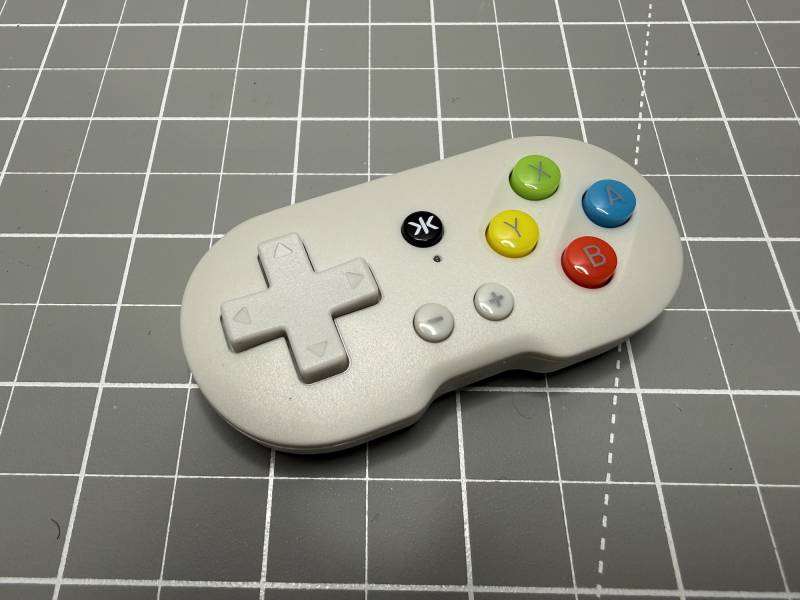
Even with its ultra-small size, the CRKD ATOM manages to include the essential controls you’d expect from a Bluetooth controller.
On the front/top, you get:
- A directional pad
- Plus and minus buttons
- X, Y, A, and B buttons
- A power/pairing button
Along the back edge, there’s a USB-C port for charging. You’ll also find very small shoulder buttons, plus two additional top-edge buttons.
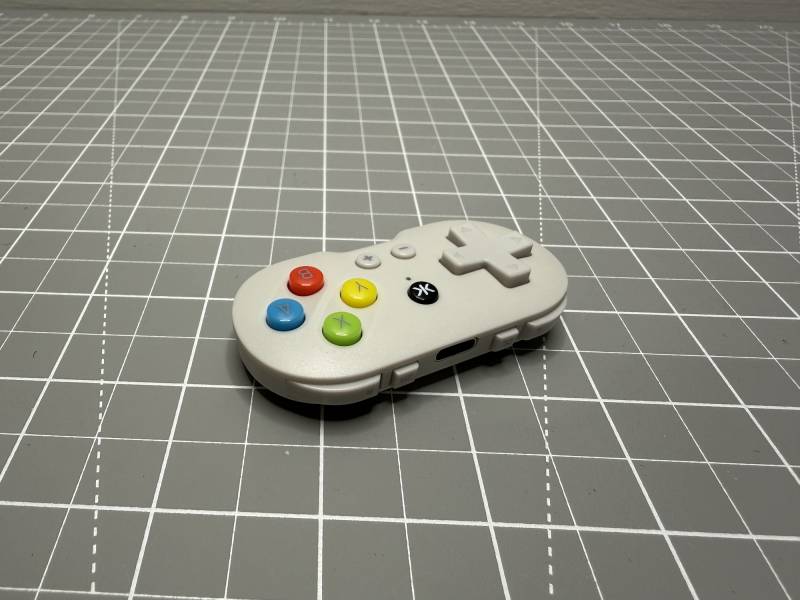
Because this is a keychain gaming controller, every control is scaled down. That makes the device highly portable, but it also means the buttons and shoulder triggers are correspondingly tiny. The upside is obvious: it can fit just about anywhere. The tradeoff is that this won’t feel like a full-size console controller in your hands. That might be a problem if you have large hands and fingers. I feel like I have average hands for a female, and I had zero problems holding and using the ATOM.
The included lanyard attaches directly to the controller, which makes sense for something this small. It adds a little extra convenience if you want to hang it from a case, backpack, or keyring-style setup.
Charging and Setup
Before pairing, the CRKD ATOM needs a charge using the included USB-C cable. The cable itself is very short, which matches the compact theme.
Pairing with an iPhone is straightforward. To enter pairing mode, hold the home and up buttons at the same time for a few seconds. Once the controller starts blinking, it’s ready to connect. Pairing with Android is similar, but instead of holding the up button with the home button, you hold the down button.
In the iPhone’s Bluetooth menu, the controller appears as an Xbox controller. Tap it, and the connection completes quickly.
Testing It with an iPhone Game
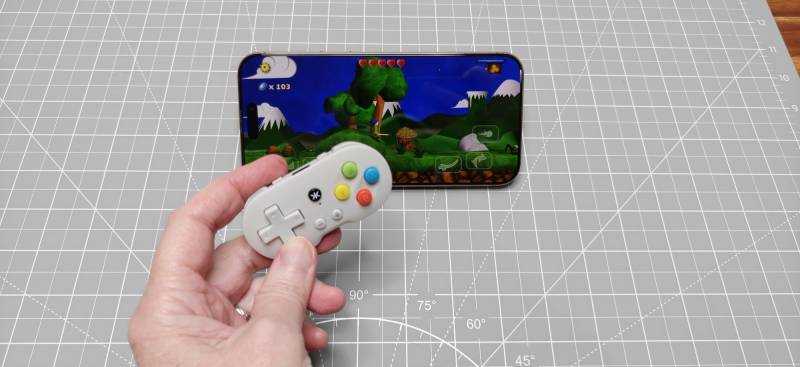
After pairing, it was time for the real test: launching a game and seeing whether this tiny controller could do more than just look adorable on a keychain. I tested the ATOM with a game called Swordigo.
In the game, movement worked right away. The D-pad controlled the character as expected, and the XYAB buttons mapped to different actions. One button triggered a sword attack, another performed a different attack, and another made the character jump.
The shoulder buttons were recognized, too, though their actions depended on the game. In this case, one button opened a menu-like screen, while another brought up weapons. That’s pretty typical behavior for mobile controller support: each game can map the buttons differently, so the exact layout will vary.
The important part is that the controller was responsive and usable. The character moved, attacked, jumped, and navigated menus without issue. That confirms the CRKD ATOM is more than just a novelty item. It can handle real gameplay. So yay for that!
Why a Keychain Gaming Controller Makes Sense
For mobile gaming, on-screen controls are often the weakest part of the experience. Virtual buttons can feel awkward, especially in action games where movement and timing matter. And they sometimes block things on the screen that you need/want to see while paying. That’s where a tiny physical controller like this one becomes appealing.
The CRKD ATOM gives you tactile controls without forcing you to pack a standard-size gamepad. If you travel often, that matters. It’s easy to imagine using this on a plane, during downtime in a hotel, or while waiting around somewhere with just your phone and a few spare minutes.
That portability is really the strongest argument in favor of this keychain gaming controller. It’s not trying to replace your main controller at home. It’s trying to be the controller you actually bring with you.
Performance Impressions
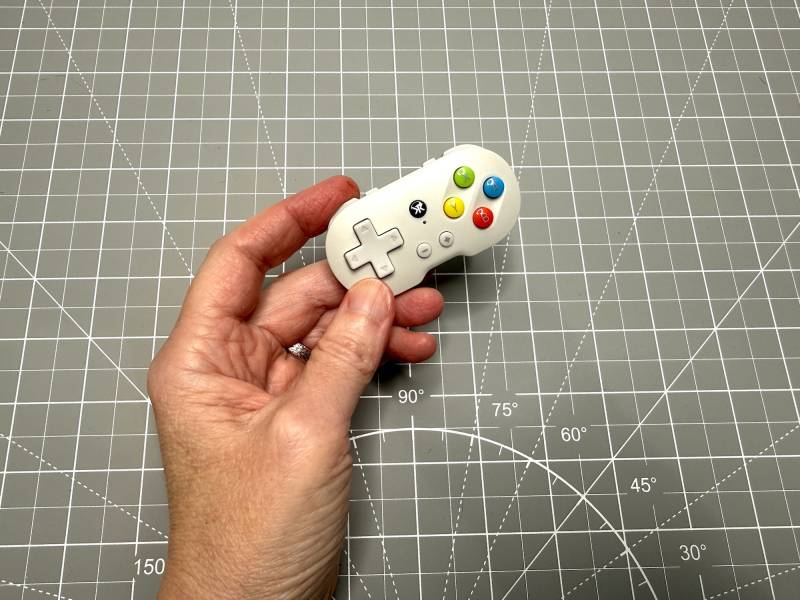
In actual use, the little controller works well. Of course, the tiny size is both a feature and a compromise. If you want long, comfortable sessions or full ergonomic grips, this probably won’t replace a larger controller. But for short sessions and travel, the compact design is exactly what makes it attractive.
See it in Action
Final Thoughts
The CRKD ATOM is a clever little gadget. As a keychain gaming controller, it delivers the one thing it needs to: portable physical controls that are easy to take anywhere. It’s cute, pocketable, simple to pair with, and it works well enough with iPhone gaming to be genuinely useful.
If your main goal is convenience, this tiny controller makes a lot of sense. It’s the kind of accessory that can live in your pocket or travel bag and be ready whenever touchscreen controls get frustrating. For that reason alone, it’s a keeper and is going with me on all my trips from now on.
The CRKD ATOM retails for $19.99; it is available directly from the manufacturer and other retailers, including Amazon.
Source: Personal purchase
What I Like: Extremely small and travel-friendly; Includes charging cable, guide, and lanyard; Easy Bluetooth pairing with phone/tablet; Works well for games that support controllers; More satisfying than on-screen controls for mobile gaming
What Needs Improvement: The tiny size may limit comfort for longer gaming sessions; Buttons may be too tiny for some fingers


Might be uncomfortable for longer sessions, but looks like it might be perfect for waiting rooms.
It seems like something that someone would really need to try for themselves to see if it works for them.