
The Lowdown
As a set, the Anker Nano Charging Station, MagGo Power Bank 2 Pro and MagStand Charging Station earn a 4.5 out of 5. The Nano station gives a busy kitchen six ports in a footprint about the size of a phone. The MagGo Power Bank 2 Pro pairs true 25W wireless charging with a fan, a screen and a kickstand. The MagStand is a well-thought-out desk charger with a retractable 60W cable and a screen that does more than it needs to.
Overall
Pros
- Nano Charging Station’s four USB-C and two USB-A ports handle all sorts of devices
- Great for a busy kitchen where we charge many devices
- 100W laptop ports and 150W total are plenty for multiple devices without being overkill
- Nano Charging Station’s slim body takes up very little room
- Qi2.2 25W fast wireless charging on the MagGo Power Bank 2 Pro and MagStand
- Built-in active cooling on both wireless chargers
- MagGo Power Bank 2 Pro recharges fast at 45W over USB-C
- MagGo Power Bank 2 Pro has a built-in display and kickstand
- MagStand’s built-in 60W retractable USB-C cable
- Adjustable angle on the MagStand’s wireless charging pad
- MagStand’s smart display does much more than show charging stats
Cons
- MagGo Power Bank 2 Pro is slightly thick and heavy, though that comes with the territory
- MagGo Power Bank 2 Pro is pricey
- MagStand has no built-in Apple Watch charger
- Nano Charging Station doesn’t include USB cables
Every house has a charging problem, and ours lives in the kitchen. Phones, earbuds, tablets and the occasional laptop all land on the same stretch of counter at some point in the day, competing for the same outlets and whichever cables haven’t wandered off to a bedroom. Leave the house and the problem changes shape. Then it’s a phone at 20 percent by mid-afternoon with no outlet in sight. Anker has helped many families with this problem, and it looks like there’s no stopping them.
Anker sent us three products that each go after a different piece of that problem. The Anker Nano Charging Station (6-in-1, 150W) is a slim desktop charger with four USB-C ports and two USB-A ports. The Anker MagGo Power Bank 2 Pro is a 10,000mAh magnetic battery with 25W wireless charging, a tiny built-in fan, a screen and a kickstand. The MagStand Charging Station is a desk charger with a 25W magnetic charging pad, a retractable USB-C cable and a screen of its own.
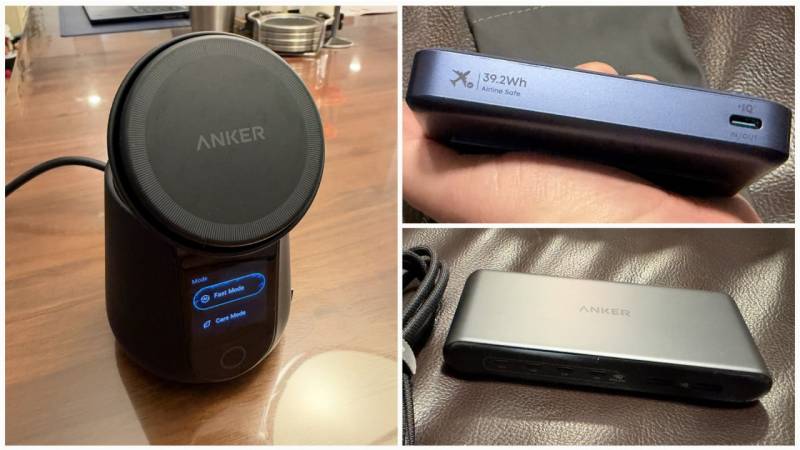
The two wireless products are built around Qi2.2, the newest version of the Qi wireless charging standard. Like Apple’s MagSafe, Qi2 uses magnets to line a phone up with the charging coil, and the 2.2 update raises the speed limit to 25W from the 15W that earlier Qi2 chargers topped out at. More speed means more heat, which is why both of them have fans inside.
I’ve been using all three for about a month. The Nano Charging Station has been on our kitchen counter, the MagStand has been on my desk, and the MagGo Power Bank 2 Pro has been my daily-carry battery.
Quick Specs
Anker Nano Charging Station (6-in-1, 150W), model A1A05
Price: $79.99
Ports: 4 USB-C, 2 USB-A
Total output: 150W max
USB-C1 and USB-C2: 100W max each when used alone
USB-C3 and USB-C4: 45W max each
USB-A: 12W max
Power sharing: PowerIQ 4.0
Safety: ActiveShield 4.0 temperature monitoring
Plug: 90-degree foldable plug with flat braided power cord
Input: 100–240V AC, 50–60Hz
Dimensions: 5.9 x 2.7 x 0.87 inches (149 x 67.5 x 22 mm)
Weight: 0.64 pounds (290 g), not including power cord
Colors: Iron Gray, Radiant White
USB cables: Not included
Anker MagGo Power Bank 2 Pro (10K, Qi2 25W, Active Cooling), model A110R
Price: $109.99
Capacity: 10,000mAh
Wireless output: 25W max (Qi2.2)
USB-C: 45W max output and input
Recharge time: 80 percent in 52 minutes, per Anker (requires a 45W cable, sold separately)
Cooling: Built-in fan with Cool and Silent modes
Display: Smart Display with six screens, including battery level, battery health and temperature
Stand: Built-in kickstand
Compatibility: iPhone 13 through iPhone 18 series, excluding iPhone 16e, per Anker; other Qi2 phones charge at 15W
Dimensions: 2.79 x 4.14 x 0.7 inches (71 x 105 x 18 mm)
Weight: 7.7 ounces (218 g)
Colors: Phantom Gray, Burgundy Red, Polar Night Blue, Starlight Silver
Anker MagStand Charging Station, model A1504
Price: $115.99
Wireless output: 25W max (Qi2.2)
Retractable USB-C cable: 60W max
USB-C port: 30W max
Total output: 60W max (55W with all three outputs in use)
Display: 1.54-inch screen showing wattage, temperature and time remaining; also shows photos, weather and an AI pet screensaver
App: Anker Power app, over Bluetooth or Wi-Fi
Cooling: Built-in active cooling
Stand: Adjustable phone stand
Power: 100–240V AC input
Dimensions: 3.15 x 3.15 x 4.02 inches (80 x 80 x 102 mm)
Weight: 16.8 ounces (476 g)
Colors: Light Sand Beige, Black
Anker Nano Charging Station: Six Ports and Barely Any Counter
The first thing that struck me was how little counter space the Nano station takes up for something with six ports.
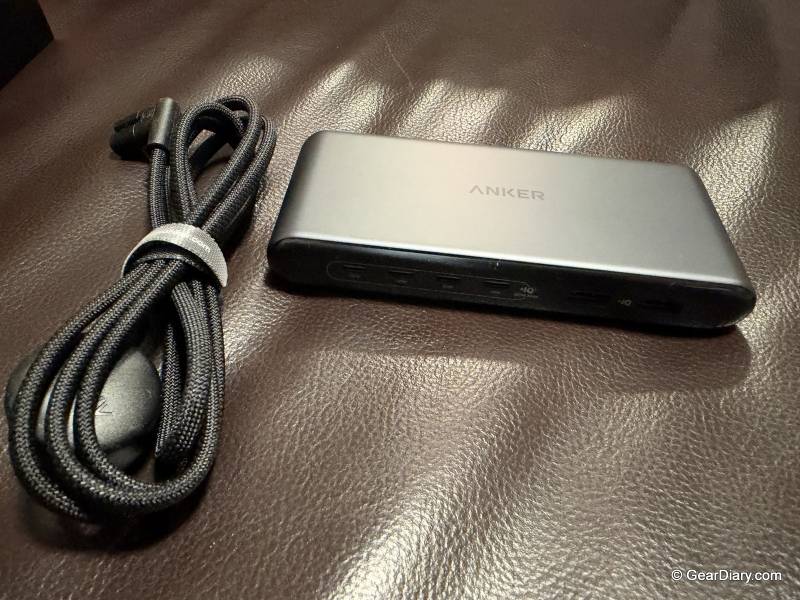
Anker Nano Charging Station
Anker rates the Nano Charging Station at 150W total. The two top USB-C ports can each deliver up to 100W on their own, which Anker says is enough to charge a MacBook Pro. The other two USB-C ports top out at 45W, and the two USB-A ports are good for 12W. In between, Anker’s PowerIQ 4.0 does the bookkeeping. That’s Anker’s name for the chip that works out what each connected device can take and splits the 150W budget to match.
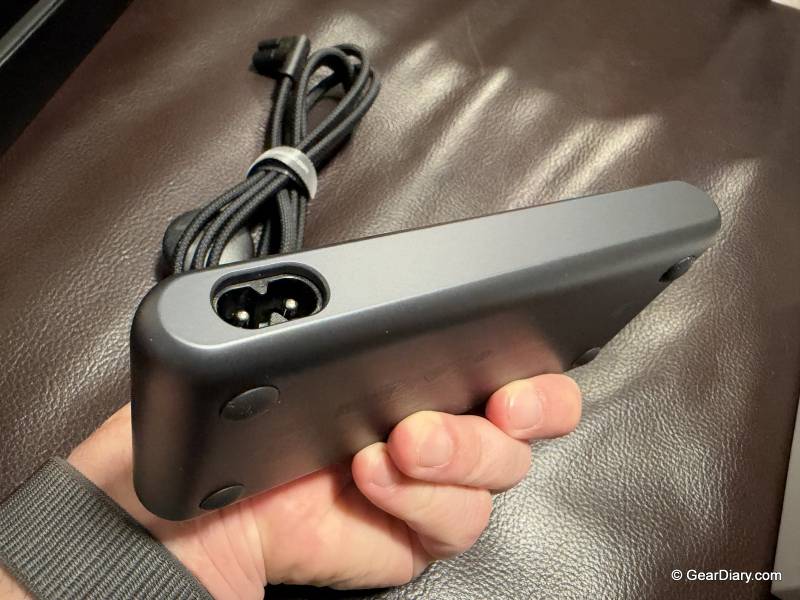
Anker Nano Charging Station
In our house, it went straight to the kitchen, because that’s where most of our charging happens. Four USB-C ports means phones, tablets and a laptop all get a proper fast-charging port, and the two USB-A ports take care of the older cables every household seems to keep. They’re the ports for the cables that live in a junk drawer and refuse to die.
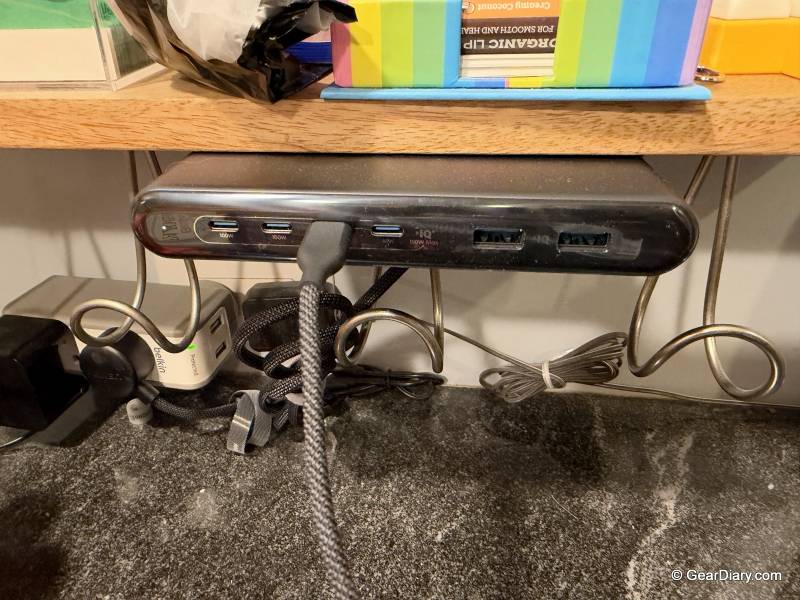
Anker Nano Charging Station
The size is what sold me. At 5.9 by 2.7 inches (149 by 67.5 mm), its footprint is about the same as a phone’s, and at 0.87 inches (22 mm) thick it sits low on the counter instead of towering over it. The foldable plug and flat cord help on the other end, too, since the plug doesn’t stick far out of the wall.
The 150W rating hits a sweet spot for a family kitchen. One laptop can take a full 100W from either of the top ports while phones and earbuds share what’s left. You’d need to step up to a 200W or 250W station to charge two laptops at full speed, but most kitchens don’t need that, and the Nano station doesn’t make you pay for it.
There are a couple of things to know before buying. Anker doesn’t include any USB cables, so you’ll be supplying your own. It also has no AC outlets, so it won’t double as a power strip for the coffee maker. And Anker notes that its overtemperature protection may reduce output during long stretches at full load.
Anker MagGo Power Bank 2 Pro: A Battery with a Fan, for Good Reason
The Anker MagGo Power Bank 2 Pro is a 10,000mAh battery (milliamp-hours, the standard measure of battery capacity) that snaps magnetically onto the back of an iPhone and charges it wirelessly at up to 25W. Anker claims that’s enough to take an iPhone 17 Pro to 50 percent in about 25 minutes.
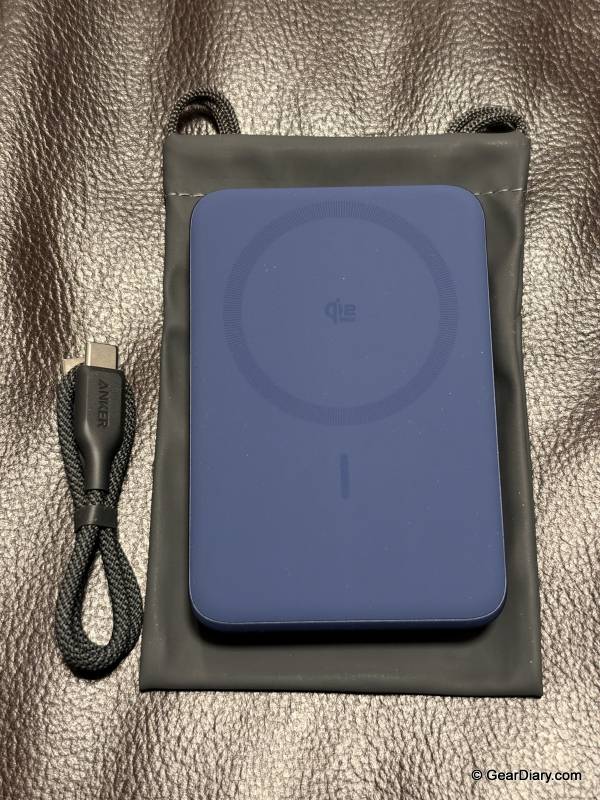
Anker MagGo Power Bank 2 Pro
The fan is the reason that number is believable. Heat is the enemy of wireless charging. When a phone gets warm, it slows its own charging to protect the battery, so a 25W rating doesn’t mean much if the phone and power bank cook each other. Anker built a fingertip-sized fan into the pack, along with its ActiveShield 5.0 system, which keeps checking temperatures and adjusting the fan. Anker says the combination keeps the pack below 96.8°F (36°C).
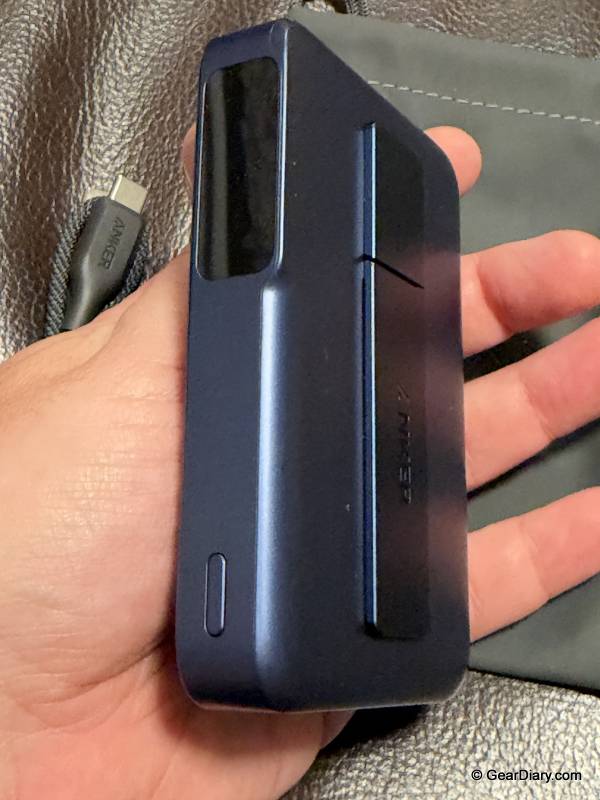
Anker MagGo Power Bank 2 Pro
There’s also a Silent mode that turns the fan off when you’d rather have quiet than speed. Having active cooling in a power bank is one of the main reasons I’d pick this one over a cheaper pack.
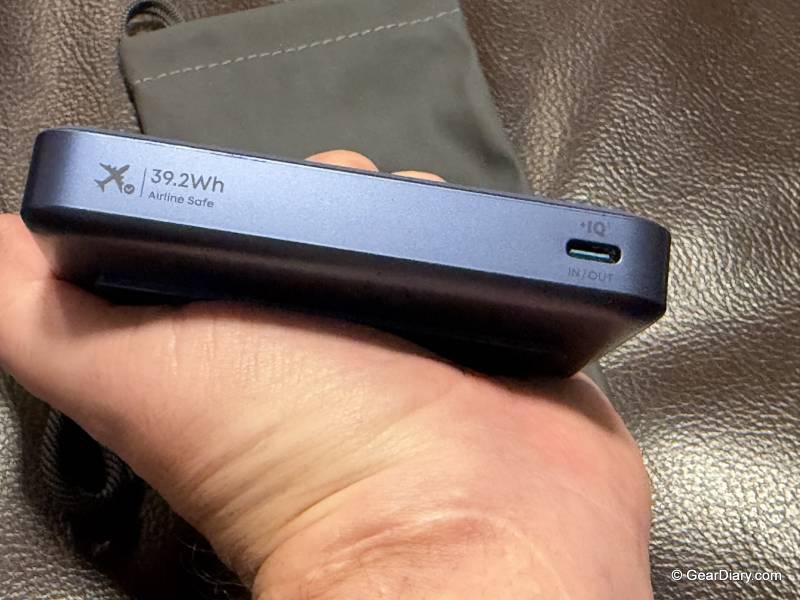
Anker MagGo Power Bank 2 Pro
Recharging the battery is quick, too. It takes up to 45W over USB-C, and Anker says that gets it to 80 percent in 52 minutes. You’ll need a cable rated for 45W or more to hit that speed, and Anker doesn’t include one. The same port puts out up to 45W, so it can top up an iPad or other USB-C gear in a pinch.
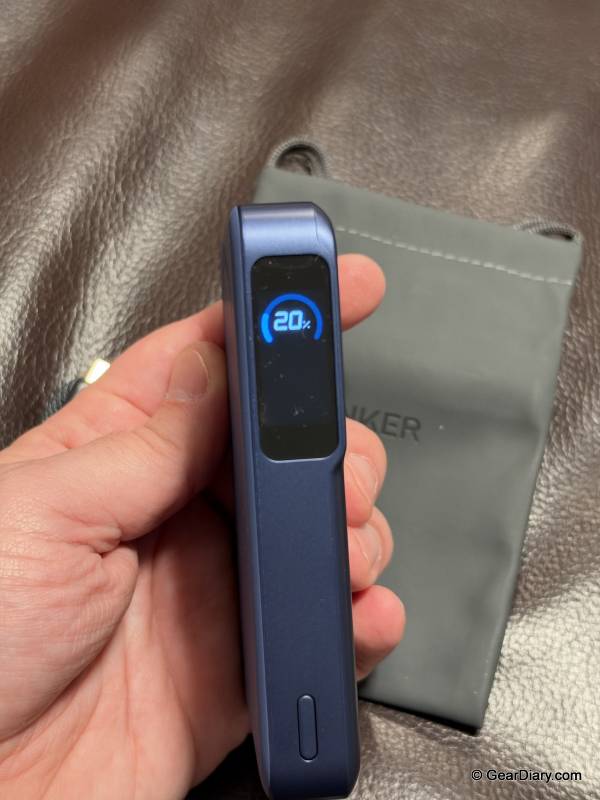
Anker MagGo Power Bank 2 Pro
Then there’s the kickstand. Flip it out and the pack props your phone up for a video call or a show. Anker also lets you switch off wireless charging, so the pack can act as a magnetic stand without draining itself into your phone.
All of that comes at a cost in size. The MagGo Power Bank 2 Pro measures 0.7 inches (18 mm) thick and weighs 7.7 ounces (218 g), and snapped to the back of a phone, it’s noticeably chunky. That comes with the territory. A 10,000mAh battery with a fan and a screen was never going to be slim, and other 25W packs at this capacity aren’t much thinner.
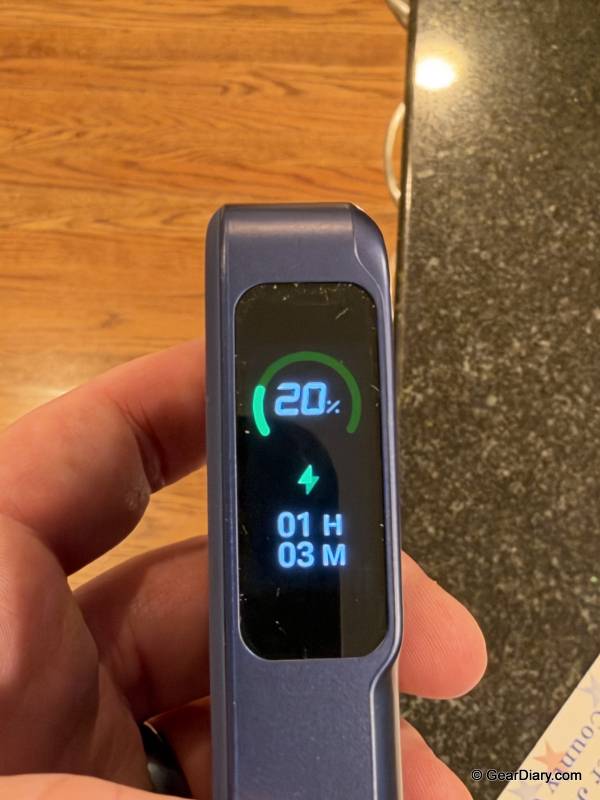
Anker MagGo Power Bank 2 Pro
It’s also pricey at $109.99. Then again, this is a battery that spends its day stuck to the back of my phone, and there’s no brand I’d trust more with that job than Anker.
Anker MagStand Charging Station: One Puck Short of Perfect
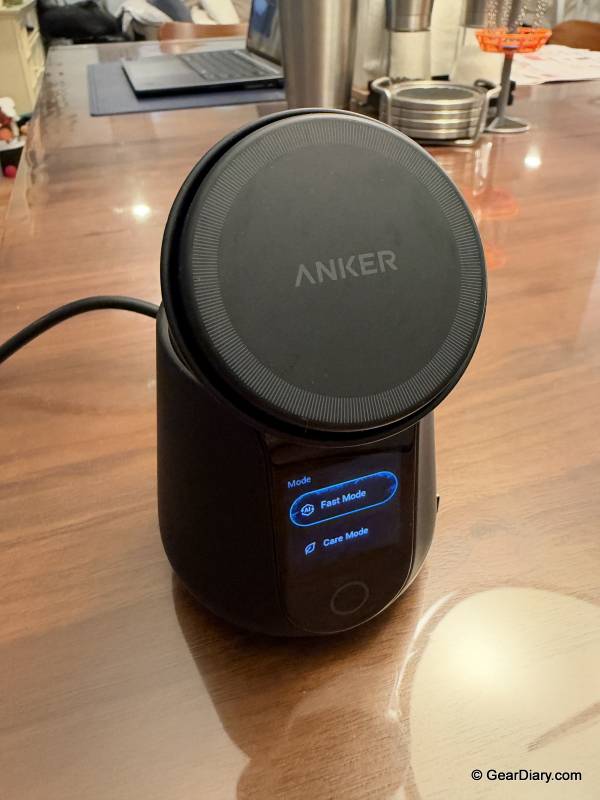
The Anker MagStand Charging Station is the one that lives on my desk, and it’s the most complete of the three. Its magnetic pad supports Qi2.2 at up to 25W, and Anker claims it can charge an iPhone 18 Pro from zero to 50 percent in about 22 minutes. It also has active cooling. In Anker’s internal testing, a phone on the MagStand stayed at 94.3°F (34.6°C), compared to 108°F (42.2°C) on another 25W wireless charger.
Anker MagStand Charging Station
The pad sits on an adjustable stand, so I can tilt the phone to an angle that’s easy to read while I’m working. Below that is the feature that sets it apart, a retractable USB-C cable rated for 60W. Pull it out to charge a tablet, earbuds or even a laptop, and it reels back in when you’re done. There’s no loose cable lying across the desk, and no cable for someone else in the house to borrow and never return.
A separate USB-C port adds another 30W output. The total output tops out at 60W, though, and drops to 55W with all three outputs in use, so a laptop on the retractable cable will share power with everything else.
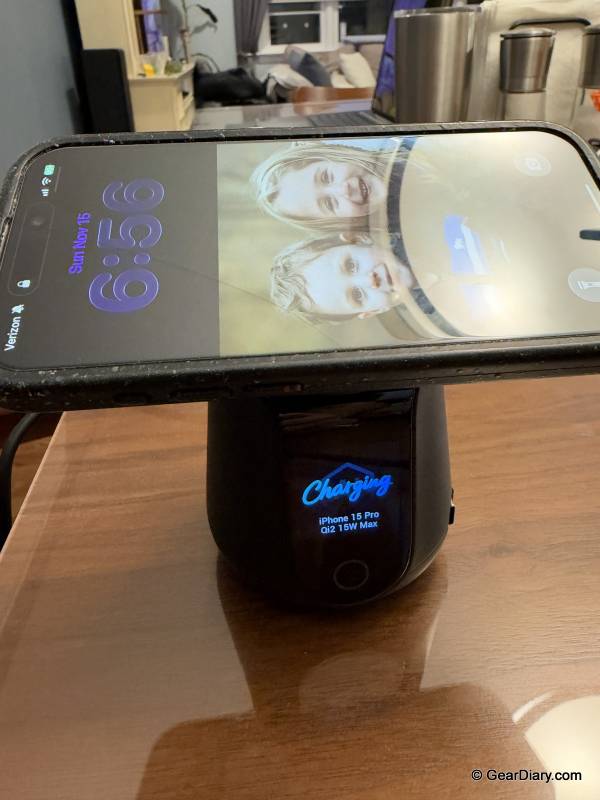
Anker MagStand Charging Station
My one real complaint is that there’s no built-in Apple Watch charger. Anker lists Apple Watch as compatible, which in practice means plugging your own Watch charger into the USB-C port. That works, but it puts a cable back on the desk, which is exactly what this stand is designed to get rid of. With a Watch charger built in, this would be the perfect desk charger for me.
Smart Displays: Chargers That Tell You What They’re Doing
Both wireless products have screens, which sounds like a gimmick until you use them.
The MagGo Power Bank 2 Pro’s Smart Display has six screens, including charging status, battery level, battery health and temperature. A side button cycles through them, and a double-tap switches modes or turns wireless charging on and off. Knowing exactly how much charge is left beats guessing from a row of four LEDs.
The MagStand’s 1.54-inch screen does more. While charging, it shows real-time wattage, temperature and time remaining, which is the easiest way I know to confirm a phone is actually getting the 25W on the box. When it’s not busy charging, it can show your photos, live weather or an AI pet screensaver. Those extras are set up through the Anker Power app, which connects over Bluetooth or Wi-Fi, and the weather and pet screens need Wi-Fi. Double-tapping the display turns on Care Mode, which Anker says adjusts charging power overnight to reduce battery aging by up to 20 percent while running quietly, below 16 decibels.
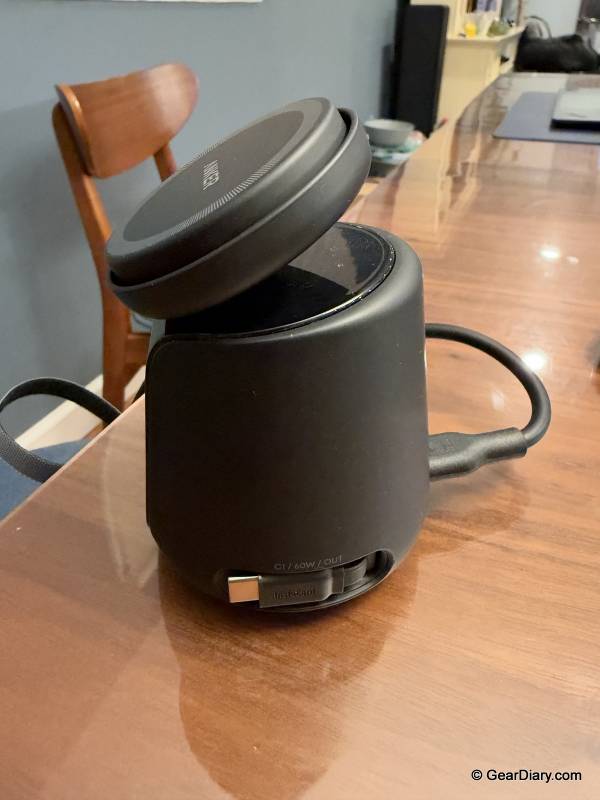
Anker MagStand Charging Station
Setup and Upkeep: Plug In, Bring Your Own Cables
There isn’t much to set up here. The Nano station and the MagStand plug into the wall, and the MagGo Power Bank 2 Pro just needs a charge. The Anker Power app is only needed for the MagStand’s screen extras, not for charging.
The main hidden cost is cables. The Nano station ships without USB cables, and the power bank’s fast recharge depends on a 45W-rated cable you may not already own. The MagStand’s retractable cable takes care of itself.
There are no consumables and no required subscription. Anker’s product pages promote an Anker Plus membership, but that’s a store membership for shipping perks, not something any of these products need to work.
The fans are the only moving parts. Anker says it has seen no dust-related loss in cooling performance in similar products over 1.5 years. A month of testing can’t confirm that, so it’s worth keeping an eye on. All three come with Anker’s Hassle-Free Warranty and a 30-day money-back guarantee.
Where They Fit Against Other Chargers
At $79.99, the Nano Charging Station has plenty of competition, much of it from Anker itself. The Anker Prime Charger (200W, 6 Ports, GaN) has the same port count, a bigger 200W budget and 100W on every USB-C port, and it was $69.99 on Anker’s site as I wrote this. That’s the better buy for a house where two laptops charge at the same time. One step up, the Anker Prime 250W 6-port Charging Station adds a 2.26-inch display and lists for $149.99, though it often sells for less. If you need outlets as well as USB ports, Anker’s Prime 6-in-1 Charging Station (140W) includes two AC outlets and lists for $79.99.
The MagGo Power Bank 2 Pro, at $109.99, sits near the top of the 25W magnetic battery category. The UGREEN MagFlow 10,000mAh Qi2 25W power bank costs $79.99 and adds a built-in USB-C cable, but it tops out at 30W wired. Belkin’s UltraCharge Pro Magnetic Power Bank 10K is $99.99 with a kickstand and display, also with 30W wired charging. At the other extreme, the UGREEN MagFlow Pro adds liquid cooling for $149.99 but is even bulkier. Anker’s 45W input and output give it the edge over the cheaper options.
The MagStand Charging Station is $115.99, and its closest rivals answer my one complaint about it. The Anker Prime Wireless Charging Station (3-in-1, MagGo, AirCool, Foldable) is $149.99 and charges an iPhone, Apple Watch and AirPods at once, with a 45W adapter in the box, though you give up the retractable cable. Belkin’s UltraCharge Pro 3-in-1 Magnetic Charging Dock with Qi2 25W is $129.99 and also has a built-in Watch charger and active cooling. At the high end, Anker’s Prime Wireless Charging Station (3-in-1, MagGo, AirCool, Dock Stand) launched at $229.99.
You should buy something else if you wear an Apple Watch and want it on the same stand as your phone, or if you use an Android phone. The MagGo Power Bank 2 Pro charges other Qi2 phones at 15W, not 25W, and Anker’s compatibility lists for both wireless products are built around Apple devices. Skip the Nano station if you need AC outlets or regularly charge two laptops at full speed.
The Bottom Line
As a set, the Anker Nano Charging Station, MagGo Power Bank 2 Pro and MagStand Charging Station earn a 4.5 out of 5. The Nano station gives a busy kitchen six ports in a footprint about the size of a phone. The MagGo Power Bank 2 Pro pairs true 25W wireless charging with a fan, a screen and a kickstand. The MagStand is a well-thought-out desk charger with a retractable 60W cable and a screen that does more than it needs to.
The limitations are few. The MagGo Power Bank 2 Pro is thick, heavy and expensive for a 10,000mAh pack. The MagStand has no built-in Apple Watch charger. And you’ll need to supply your own cables for the Nano station.
Where this trio shines is a household that charges a lot of devices in one place and wants fast wireless charging at the desk and on the go, especially if everyone in it carries an iPhone.
The Anker Nano Charging Station (6-in-1, 150W) retails for $79.99; it is available directly from the manufacturer. and other retailers, including Amazon. The Anker MagGo Power Bank 2 Pro retails for $109.99; it is available directly from the manufacturer and other retailers, including Amazon. The Anker MagStand Charging Station retails for $115.99; it is available directly from the manufacturer and other retailers, including Amazon.
Source: Manufacturer-supplied review samples
What I Like: Nano Charging Station’s four USB-C and two USB-A ports handle all sorts of devices; Great for a busy kitchen where we charge many devices; 100W laptop ports and 150W total are plenty for multiple devices without being overkill; Nano Charging Station’s slim body takes up very little room; Qi2.2 25W fast wireless charging on the MagGo Power Bank 2 Pro and MagStand; Built-in active cooling on both wireless chargers; MagGo Power Bank 2 Pro recharges fast at 45W over USB-C; MagGo Power Bank 2 Pro has a built-in display and kickstand; MagStand’s built-in 60W retractable USB-C cable; Adjustable angle on the MagStand’s wireless charging pad; MagStand’s smart display does much more than show charging stats
What Needs Improvement: MagGo Power Bank 2 Pro is slightly thick and heavy, though that comes with the territory; MagGo Power Bank 2 Pro is pricey; MagStand has no built-in Apple Watch charger; Nano Charging Station doesn’t include USB cables


Be the first to comment on "Anker Nano Charging Station, MagGo Power Bank 2 Pro, and MagStand Charging Station Review: Anker Charging Trio Review: Three Clever Ways to Tame Your Cable Chaos at Home, at Your Desk, and on the Go"