

How many times have you had to plan a project whether at work or home and best illustrated using a flow chart? I know many times I have mapped out my plans in this form on a scratch piece of paper. Instaviz makes this mind mapping possible on your iPhone, iPod Touch or iPad using a slick, yet simple interface. The charts or maps you create will look professional and are customizable and quickly created. Share your project easily with colleagues or friends right from the app. Lets take a look at Instaviz and give you a chance to win a copy for yourself.

Instaviz is actually a screen size white board ready for your map to be made. To make the chart, simply draw the desired shape on the screen and it will be recognized and drawn for you. Draw circles, squares, triangles, diamonds and ellipses with your finger and watch it transform. To connect nodes, just draw a line from one to the other and the nodes will be rearranged and the line added. All of this is made possible from a shape recognition engine called Recog. This engine translates your sketched shapes almost instantly and is quite accurate. The recognition abilities of the app are truly its strength. Check out the video at the bottom of this post to watch it in action.
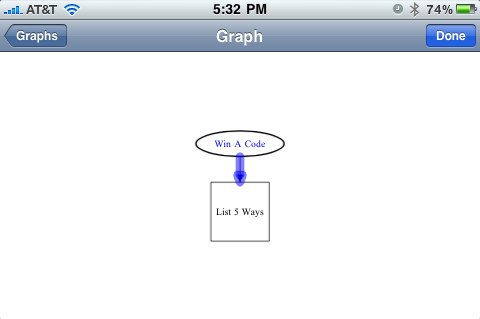
Not only does Instaviz recognize the shapes drawn and order the nodes according to the lines drawn, but each of these nodes and lines are fully customizable. Change the colors, line widths and even choose from a large number of fonts. When a shape is drawn it will have a number. Double tap to open the node editor and customize away. Simple and fast to use.
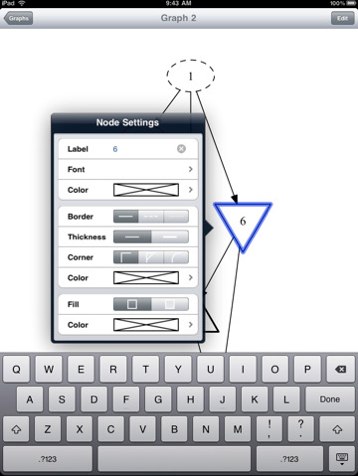
One improvement I would like to see is the ability to move the nodes around freely. With football quickly approaching, I can envision drawing plays and adjustments on with this app if I could move the nodes around. Maybe a free draw mode could be chosen to allow for this.
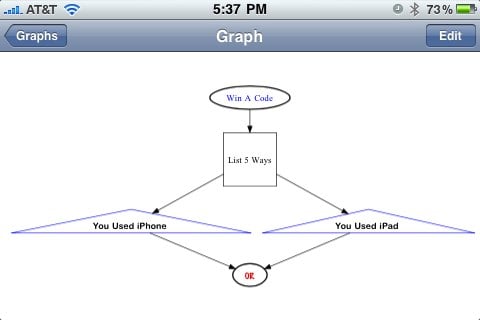
You will be amazed at the professional look of each map or chart and how easy it really is to create. It literally took me longer to click the screen shots than it did to create and customize the graph you see in the post.

I created this graph on the iPhone, but since the app is universal, it is also usable on the iPad where it is beautiful. The added screen real estate makes the app much better. The app supports retina display, multitasking and video output to external displays so IOS 4 and iPhone 4 users will be able to utilize all of the new features with Instaviz.
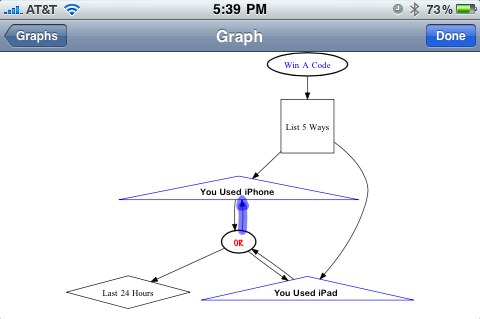
In case you have not noticed, to win a code (and we have several to give away) tell us five ways you have used your iPhone or iPad (or both) in the last 24 hours in the comments section. Winners will be chosen randomly from the comments.
The user experience and recognition engine makes this an amazing application for creating beautiful flow charts. You have to use Instaviz in order to understand how fluid and simple it is. Get the universal app here in the app store for $9.99 and experience it for yourself. I love thoughtful polished apps!
What I like: The recognition engine is super fast and accurate and the graphs are so fast to create and look amazing.
What could use improvement: Please give us a free draw mode! I have lots of ideas with the ability to move things where I want them.

1) Read an ebook.
2) Checked email.
3) Read/posted on Twitter.
4) Checked/read RSS feeds.
5) Played a game.
RT @geardiary: Instaviz For iPhone/Touch/iPad Review and Giveaway #Apple iPad Applications #Apple iPhone and Touch http://bit.ly/c8mW89
geardiary: Instaviz For iPhone/Touch/iPad Review and Giveaway $AAPL – http://bit.ly/9mcVFl
perfect flowchat for ipad – http://www.geardiary.com/2010/06/30/instaviz-for-iphonetouchipad-review-and-giveaway/
Checked Twitter
Checked Facebook
Checked email
Played Words With Friends
Made a grocery list in ShopShop
Watched video content
Sent some emails
Used Things to manage tasks/projects
Read an eBook using iBooks
Browsed the internet
Read ebooks in Stanza
Browsed the Web with Safari
Checked Twitter.
Looked up weather forecasts in WeatherEye.
Went onto Facebook with the Facebook app.
Instaviz For iPhone/Touch/iPad Review and Giveaway http://bit.ly/czJTJM
Instaviz For iPhone/Touch/iPad Review and Giveaway http://bit.ly/czJTJM
Today:
1. Woke up at 7am. Played Words With Friends on the iPad while trying to get out of bed.
2. Checked in at 9am at the studio with Foursquare on the iPod Touch.
3. Read another chapter of “The Passage” on iBooks for iPod Touch while having lunch.
4. Took preproduction notes at 1pm with Note Taker HD and a Pogo Stylus on the iPad.
5. Recorded a synth solo at 3pm for a TV commercial soundtrack with MorphWiz (nice app!) for iPad.