

There are a lot of different choices when it comes to word processing on the iPad, iPhone and Mac. One key to deciding which to use, at least for me, is finding one that works seamlessly on all my different Apple devices. iA Writer is a good option, so is simply using the native notes app. Elements is another good choice, and it just got updated to version 2.3. Of course support for the retina display on the new iPad is a key feature of the update, but there are others as well. As SecondGear, the company behind the app explains,
Elements 2.3 is designed to look stunning on Apple’s all new iPad. Every asset has been updated to look great on the iPad retina display.
Elements 2.3 also adds support for pull-to-refresh manual syncing of the folder you are viewing. If you make a change to a file or folder on your Mac or PC, you can now just refresh the folder in Dropbox without relaunching the app.
Pull-to-refresh isn’t the only feature they’ve added. You can now swipe right-to-left in the file you’re editing to go back to your file list. Pretty sweet, right?
It is a welcome change, and one that I appreciate. (I really wish Apple would implement it for Mail.app!)
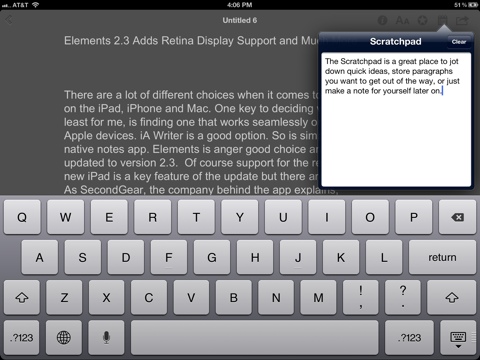
Here’s more about the app.
Elements allows you to view, edit and share plain text documents on your iPad, iPhone or iPod touch. All of your data is stored in a folder on your personal Dropbox account so that it’s accessible from any device you have.
Whether you’re a freelance writer wanting to write your next article, a student with a book report due or professional on-the-go who needs access to their notes wherever they are, Elements can work for you.

Features include:
Create, view and edit text files on your iPhone, iPad or iPod touch
Organize your files in sub-folders
Create, view, edit and preview Markdown files on your iPhone, iPad or iPod touch
Cloud based: Elements stores all its data in a subfolder on your personal Dropbox account so you can access it via your iPhone, iPad, Mac or PC
Autosaving
Offline support: upload your changes to Dropbox next time you’re connected
Full text search of your Elements files
Word counts, line counts, character count
A Scratchpad to flesh out ideas or store random bits of information
Email files as an attachment
Sort file listings by name or modified date
Customize the look of the text editor to fit your workflow
TextExpander touch support
The app is just $4.99, and existing users can upgrade to the new version of Elements for free. It requires iOS 5, so you should only grab it if you have upgraded your iOS device. Get it here.
